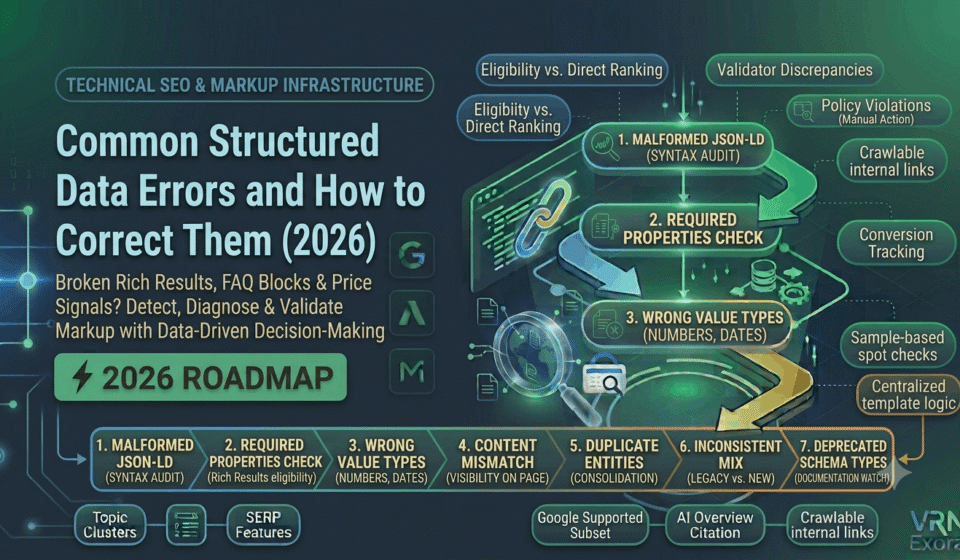

A structured data error is any problem in your JSON-LD markup that either breaks the code entirely or fails a specific rich-result eligibility rule, and both types quietly cost you the enhanced search listings that structured data exists to earn. This guide is for SEO managers, developers, and site owners who have implemented schema markup but are not seeing the rich results, star ratings, or FAQ accordions they expected. You will learn the most common structured data errors, the difference between an error that blocks eligibility and a warning that merely limits it, and exactly how to correct each one.
Why Structured Data Errors Matter More Than They Look
Structured data is not a direct ranking factor, so fixing an error will not move your position in search results on its own. What it does control is eligibility for enhanced search listings, star ratings, FAQ accordions, product prices, and event details, which can meaningfully increase click-through rate on pages that are already ranking. In 2026, structured data also plays a growing role beyond traditional search, since clean, complete markup directly improves how eligible your content is for citation in AI-generated answers, making schema quality relevant to both SEO and GEO at once.
Passing a validator only confirms your JSON-LD is syntactically correct. It does not guarantee a rich result will actually display, since Google separately decides whether to show enhanced results based on query, competition, and user intent. Understanding this distinction is the first step to correctly diagnosing why a technically valid page still is not showing a rich snippet.
Error 1: Malformed JSON-LD Syntax
Syntax errors are the most common and generally the easiest structured data errors to fix, and they prevent the schema from being parsed at all. Typical causes include a trailing comma, an unescaped quotation mark inside a string value, or a missing colon or closing brace somewhere in the JSON-LD block. Because these errors break parsing entirely, the schema effectively does not exist from Google’s perspective until the syntax is corrected.
How to fix it: Run the page through Google’s Rich Results Test and check the Code tab to see the actual rendered markup, since a property can exist in your template but output an empty string, which Google treats the same as if it were absent entirely. For sites managing schema through a CMS plugin, confirm the plugin is populating required fields correctly rather than assuming its defaults are sufficient, since many plugins only fill a property when the corresponding field in the post editor has actually been completed.
Error 2: Missing Required Properties
Every schema type has a specific set of required properties that Google checks for eligibility, and a missing required property blocks the rich result outright, unlike a missing recommended property, which typically only triggers a warning while the rich result still shows in a less complete form.
How to fix it: Cross-reference Google’s Supported Structured Data Types documentation directly, rather than relying on the full schema.org specification alone, since Google supports only a defined subset of schema.org’s complete vocabulary. Find the exact required properties for your specific type and confirm each one is present and populated with real content, not a placeholder or an empty value.
Error 3: Wrong Value Types
A property can be present but formatted incorrectly, such as a price listed as plain text instead of a properly formatted number, or a date written in a format the schema does not recognize. This kind of error parses without breaking the JSON-LD entirely, but it still fails the specific rule Google checks for that property.
How to fix it: Validate the schema against both the Rich Results Test for Google-specific eligibility and the Schema.org validator for full vocabulary and type checking, since a pass in one tool only answers that tool’s own question and does not guarantee the other will agree.
Error 4: Content Mismatch Between Markup and Visible Page
This is the one error category with real consequences beyond simple ineligibility. If your markup declares information that does not actually appear anywhere in the visible page content, such as an AggregateRating showing a strong average score with no visible reviews on the page, or a Product schema listing a price the page copy never mentions, this is treated as a policy violation rather than a technical mistake, and Google can apply a manual action that removes rich result eligibility entirely for that URL.
How to fix it: Confirm every value declared in your structured data is genuinely visible somewhere on the corresponding page, and check the Manual Actions report in Search Console periodically to catch any penalty before it silently suppresses rich results across a whole section of the site.
Error 5: Duplicate or Conflicting Entities on One Page
A page can end up with multiple different Product entities, or contradictory values for the same property, when different plugins, templates, or past implementations layer schema on top of each other without anyone removing the older version. Common symptoms include duplicate schema blocks describing overlapping content, or values that directly conflict between two blocks describing what should be the same entity.
How to fix it: The goal here is not to add more markup, it is to deduplicate down to a single, accurate representation of each entity on the page. Audit the page’s full markup, identify every schema block currently present, and consolidate to one clean, non-conflicting version rather than layering a new fix on top of the existing mess.
Error 6: Mixing Microdata and JSON-LD Inconsistently
Some sites still carry legacy Microdata markup, using attributes like itemscope and itemtype embedded directly in the HTML, alongside a newer JSON-LD implementation added later. When both exist and describe the page differently, Google may hesitate between the two, arbitrarily pick one, or simply flag the inconsistency rather than resolve it in your favor.
How to fix it: Google’s own guidance recommends JSON-LD over both Microdata and RDFa for new implementations, since it is easier to maintain and can be managed centrally without touching the page’s HTML directly. If a migration from Microdata to JSON-LD is underway, keep the overlap period as short as possible and confirm both versions describe exactly the same entity while both are live.
Error 7: Using a Deprecated or Unsupported Schema Type
Not every issue with structured data is technically an error. Google periodically retires rich result support for specific schema types, and markup for a retired type remains valid, syntactically correct code that simply no longer earns any visual treatment in search results. FAQ schema is the clearest recent example, with Google significantly scaling back FAQ rich result eligibility for most sites in 2025 and 2026, which led to a sharp drop in FAQ rich result impressions following the update. Major structural changes like this typically come with substantial advance notice, so keeping an eye on Google’s official documentation prevents a retirement from catching you by surprise.
How to fix it: If a schema type you rely on has lost rich result support, decide deliberately whether to remove the markup entirely, keep it for a narrow context where it may still apply, such as certain government or health authority sites, or shift the underlying content to a clean, visible on-page format that can still perform well through normal passage indexing rather than through schema-driven rich results.
| Error type | Does it block the rich result? |
|---|---|
| Malformed JSON-LD syntax | Yes, blocks parsing entirely |
| Missing required property | Yes |
| Missing recommended property | No, warning only, rich result still shows less fully |
| Wrong value type | Yes, for the affected property |
| Content mismatch versus visible page | Yes, and can trigger a manual action |
| Deprecated schema type | Yes, no visual treatment regardless of markup validity |
How to Validate Structured Data at Scale
Testing one URL at a time in the Rich Results Test works for a single landing page launch, but it falls apart on any site managing hundreds or thousands of similar templated pages. Use a crawler-based tool such as Screaming Frog to extract and validate JSON-LD across an entire crawl in a single pass, and focus validation effort at the template level rather than the page level, since a shared error affecting ten thousand product pages will disappear everywhere at once when the underlying template is fixed.
Pair template-level checks with sample-based spot checks after any template change, pulling a random sample from each page type and manually re-validating rather than assuming a template-wide fix worked correctly everywhere. Search Console’s Rich Result report adds a third, complementary view, since it shows what Google has actually indexed and considers eligible, which can genuinely differ from what a standalone validator reports.
How to Prioritize Fixes Across a Large Site
Prioritize required-field errors and content mismatch issues ahead of warnings, since these are the errors that actually block rich result eligibility or, worse, risk a manual action. A missing recommended property affecting a low-traffic page deserves far less urgency than a required-field error sitting on your highest-converting product template.
Keep schema logic centralized in shared templates or components rather than duplicated across individual pages, so a future fix only needs to happen once. Schedule a recurring quarterly audit specifically to catch schema drift and newly deprecated types, since structured data support changes on Google’s side independently of anything you do on your own site.
Frequently Asked Questions
Does fixing a structured data error improve my rankings?
Not directly. Structured data is not itself a ranking factor. Fixing an error restores eligibility for an enhanced search listing, which can meaningfully improve click-through rate on a page that is already ranking, rather than changing its position in the results.
Why does my page pass the Rich Results Test but still not show a rich result?
Passing the test confirms eligibility, not guaranteed display. Google decides whether to actually show a rich result based on the specific query, competition, and user intent, so a technically valid, eligible page will not always display the enhanced format.
What is the difference between an error and a warning in schema validation?
An error, such as a missing required property or malformed JSON-LD, blocks rich result eligibility outright. A warning, typically a missing recommended property, usually still allows the rich result to display, just in a less complete form.
Can a structured data mistake actually get my site penalized?
Yes, in one specific case. If your markup declares information that does not match what is genuinely visible on the page, such as a review rating with no visible reviews, Google can apply a manual action that removes rich result eligibility for that URL as a policy violation, not just a technical error.
Is FAQ schema still worth implementing in 2026?
For most commercial sites, no. Google significantly reduced FAQ rich result eligibility in 2025 and 2026, so the FAQ content should be kept visible on the page in a clean question and answer format rather than relying on schema to earn a search result visual it very likely will not receive anymore.
Should I use JSON-LD or Microdata for new structured data?
JSON-LD. It is Google’s recommended format, easier to implement and maintain centrally, and does not require embedding markup directly into your page’s HTML the way Microdata does.
Get a Free Expert Review of Your Structured Data
Diagnosing which schema errors are actually costing you rich results takes checking more than one validator. If you want a faster starting point, get a free SEO audit from VRN Exora and see exactly which structured data issues are worth fixing first.