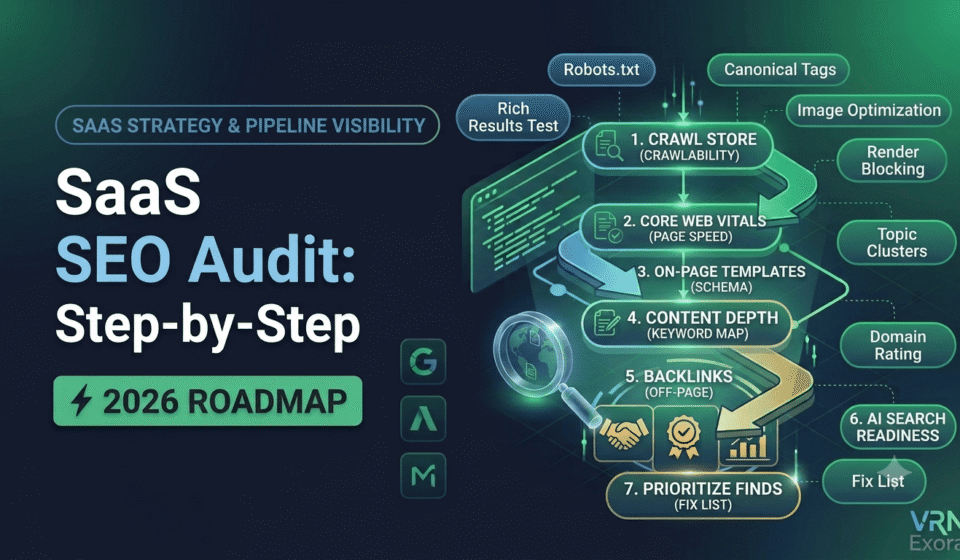

A SaaS SEO audit is a structured review of how well your marketing site turns organic search visibility into demos, trials, and signups, not just a checklist of technical fixes. This guide is for SaaS marketers, founders, and SEO managers who want a repeatable process rather than a scattered list of tips from ten different blog posts. You will learn how to check crawlability and Core Web Vitals, review your feature and pricing pages, find content gaps and keyword cannibalization, audit backlinks, and check whether your brand is even showing up when buyers ask ChatGPT or Perplexity for software recommendations.
What Is a SaaS SEO Audit?
A SaaS SEO audit is a specific evaluation of a software company’s website covering technical health, content quality, and backlink strength, with the added goal of tracking how organic traffic converts into qualified pipeline. It differs from a general website audit because SaaS businesses deal with long sales cycles, multiple decision-makers, and content types a typical blog audit does not cover well, such as feature pages, integration pages, and comparison or alternatives pages that directly influence buying decisions.
The audit should answer one central question: where is the site losing qualified buyers between the first search click and the signup? A technically flawless site that ranks well but never converts visitors into trials has not passed the audit just because the crawl report came back clean.
Step 1: Define What You Are Actually Auditing For
Before opening a crawler, record your baseline numbers: current rankings for priority terms, organic sessions broken down by funnel stage, demo and trial conversions from organic traffic, total indexed pages, and where your brand currently appears in AI-generated answers. Without this baseline, an audit produces a long list of problems with no way to tell which ones matter.
Traffic on its own is not the goal. For B2B SaaS, traffic that never converts is not a neutral outcome, it actively consumes crawl budget, muddies your analytics, and creates a false sense that SEO is working when it is not. Framing the audit around pipeline rather than rankings changes which findings you prioritize later.
Step 2: Audit Crawlability, Indexation, and Core Web Vitals
Check crawlability first, since a crawlability problem hides every other problem behind it. If Google cannot reach or index a section of your site, no amount of on-page polish on the pages it can see will fix your traffic. Open the Pages and Sitemaps reports in Google Search Console and compare the number of actually indexed URLs against your real page count, including blog posts, feature pages, and integration pages.
With a crawl from Screaming Frog or Sitebulb, check for:
- Blog or resource sections sitting on old subdomains that were never migrated or properly redirected
- Canonical tags pointing to the wrong version of a page after a redesign
- Redirect chains left over from URL changes during rebrands or replatforming
- Orphaned blog posts with no internal links pointing to them
- Thin or duplicate integration pages generated programmatically without unique content
Then test Core Web Vitals on your homepage, pricing page, and one representative feature page, since these three templates carry the most commercial weight. Organic search drives the majority of traffic for most SaaS companies, so a slow pricing page is not a minor technical detail, it is a direct tax on conversions. Audit third-party scripts such as chat widgets, analytics, and A/B testing tools, since these commonly block the main thread and push Interaction to Next Paint above the 200 millisecond threshold. Reserve fixed dimensions for images and avoid dynamically inserted banners or promotional bars that shift the layout after the page loads, since these are the usual causes of a failing Cumulative Layout Shift score.
Step 3: Review Site Architecture and Internal Linking
Site architecture decisions compound over years and are expensive to reverse later, so they deserve separate attention from routine maintenance fixes like broken links or missing meta descriptions. The most common structural issue on SaaS sites is hosting the blog on a subdomain instead of a subfolder. Google has stated that subdomains and subfolders are treated equally, but in practice, content in a subfolder such as yourdomain.com/blog tends to benefit more consistently from the domain’s overall authority than a subdomain such as blog.yourdomain.com, which search engines can treat closer to a separate site.
While reviewing architecture, also check:
- Whether the marketing site renders server-side or client-side, since heavy client-side rendering can delay how quickly new content gets indexed
- Whether high-intent pages such as pricing and comparison pages are reachable within two or three clicks from the homepage
- Whether blog content links down into relevant feature or pricing pages, rather than only linking sideways to other blog posts
- Whether documentation is treated as a separate content type with its own internal linking pattern, since product docs increasingly get cited by AI systems answering technical questions
Step 4: Audit On-Page SEO for Feature, Pricing, and Comparison Pages
Feature pages, the pricing page, and comparison or alternatives pages carry more buying intent than any blog post, so they deserve template-level scrutiny rather than a quick glance. Check that each feature page has a unique title tag and H1 built around how a buyer would actually describe the problem, not just the internal product name your team uses.
On the pricing page specifically, confirm the page loads quickly even with an interactive calculator or comparison table present, since these elements are common causes of a failing Largest Contentful Paint score. Check that structured data such as SoftwareApplication or Product schema is implemented correctly where relevant, and that FAQ content on the pricing page answers the objections buyers actually raise, such as contract length, seat limits, or what happens after a trial ends.
Comparison and alternatives pages such as “[Your Product] vs [Competitor]” deserve the same rigor. These pages are often thin, biased, or duplicated across many competitor names using the same template with only the name swapped, which weakens all of them in search engines’ eyes. A comparison page that gives a genuinely fair breakdown, including where the competitor is a better fit, tends to earn more trust and more links than one that reads like pure marketing copy.
Step 5: Find Content Gaps and Keyword Cannibalization
Pull current rankings from Search Console, Ahrefs, or Semrush and check for cannibalization, where two or more pages target the same keyword and split ranking signals between them. This is common on SaaS blogs that have published for years without a clear keyword map, resulting in three different posts loosely covering the same topic from slightly different angles.
Review content by funnel stage rather than as one undifferentiated blog archive. A top-of-funnel post that ranks well for an awareness keyword is only doing half its job if the related feature page it should point to has outdated screenshots, weak internal links, or no clear next step. The fix is often not a rewrite of the blog post alone, but reconnecting the full path from that search visit through to product evaluation.
Step 6: Audit the Organic-to-Trial Conversion Path
Most SaaS SEO audits stop at rankings and traffic, which means they miss the step where the audit actually proves its value. Open GA4 and trace the path from organic landing page to conversion, looking specifically for pages that pull strong traffic but generate weak or no assisted conversions. Those pages are leaking qualified buyers even while the traffic report looks healthy.
When reviewing conversion assets, check that bottom-of-funnel pages carry one clear, consistent call to action such as booking a demo or starting a trial, visible above the fold and repeated naturally through the page rather than buried at the bottom. Confirm that top and middle-of-funnel content offers a genuine next step deeper into the funnel instead of simply ending. Also review signup and demo request forms for unnecessary friction, since every extra required field is another chance for a qualified buyer to abandon before converting.
Step 7: Audit Backlinks, Review Sites, and AI Search Visibility
Backlink quality matters more than volume for SaaS, and referring domain relevance to your category matters more than either. Export your backlink profile and check domain rating, growth in referring domains over time, and anchor text distribution, watching for an unnatural concentration of exact-match commercial anchors.
Review sites such as G2, Capterra, and TrustRadius deserve specific attention in a SaaS audit, since they are now one of the largest sources of citations when AI systems answer software recommendation questions. Confirm your listings on these platforms are complete, current, and actively collecting reviews, since thin or outdated profiles get skipped in favor of well-maintained competitor listings.
Finally, check your AI search visibility directly. Ask ChatGPT, Perplexity, and Gemini a handful of buyer-intent questions your prospects would realistically ask, such as “best [your category] software” or “[your product] vs [main competitor],” and note whether your brand appears at all. AI referral traffic converts at a notably higher rate than average organic traffic for many SaaS companies, which makes this an increasingly important channel rather than a side experiment. If your brand is absent, the fix usually starts with clearer, more specific product documentation and comparison content that AI systems can extract complete answers from, plus stronger presence on the review sites these systems already trust.
How to Prioritize Your Findings
Score every issue you found on two dimensions: how much qualified pipeline it likely affects, and how much effort it takes to fix. A slow pricing page or a broken conversion path on a high-traffic comparison page usually outranks a missing meta description on an old blog post, even though a crawl tool will flag both with the same severity level.
Group fixes into immediate actions such as unblocking crawlers or fixing a broken form, short-term fixes such as rewriting feature page titles or compressing pricing page assets, and longer-term projects such as migrating a blog from a subdomain to a subfolder or rebuilding your comparison page template. Assign an owner and a deadline to each item, since an audit that sits in a slide deck without action delivers no return no matter how thorough the research behind it was.
Frequently Asked Questions
How often should a SaaS company run an SEO audit?
Run a full audit quarterly, since new landing pages, product updates, and content additions build up technical and content issues over time. Between full audits, monitor Search Console and Core Web Vitals monthly so problems surface before they affect a full quarter of pipeline.
What is the biggest difference between a SaaS SEO audit and a regular website audit?
A SaaS SEO audit weighs the organic-to-trial conversion path and content types like pricing, feature, and comparison pages as heavily as technical