
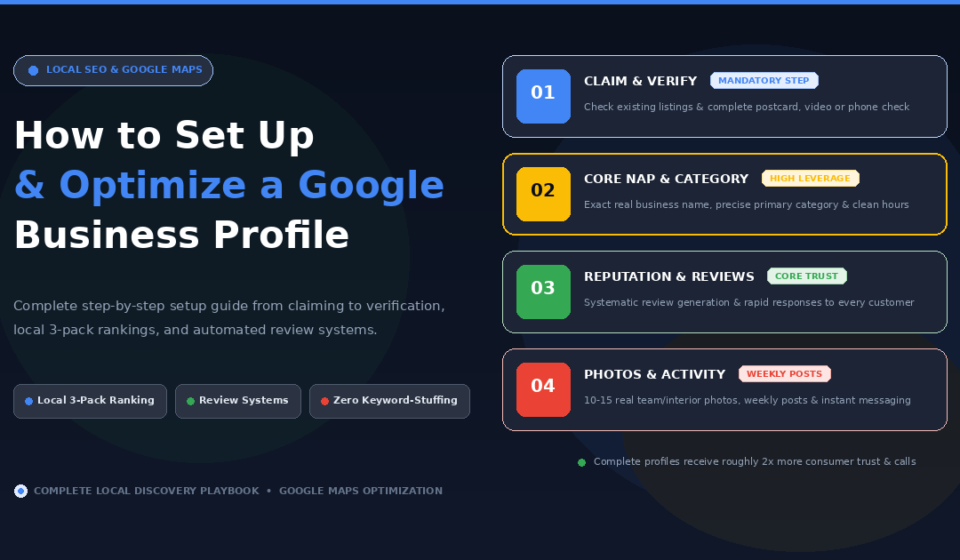

A Google Business Profile is a free listing that controls how your business appears in Google Search and Google Maps, and for many potential customers, it is the first, and sometimes only, thing they see before deciding whether to contact you. This guide is for business owners and marketers setting up a Google Business Profile for the first time, or cleaning up a neglected one, who want a clear, complete process rather than a half-finished listing collecting digital dust. You will learn how to claim or create your profile, verify it properly, fill out every section that actually drives calls and visits, and keep it active enough to stay competitive in local search.
Why Your Google Business Profile Matters More Than You Think
Your Google Business Profile shapes nearly every step of how a local business gets discovered and chosen, from where you appear in the local map pack to whether AI tools put you on a shortlist when someone asks for a recommendation nearby. Businesses with genuinely complete profiles are roughly twice as likely to be considered reputable by users, and they see significantly more calls, direction requests, and website clicks than incomplete ones. Google itself now captures the large majority of all online reviews, which makes your profile the single biggest stage for local trust and reputation, not a secondary directory listing to fill out once and forget.
Step 1: Check Whether a Listing Already Exists
Before creating anything new, search for your business name and city in both Google Search and Google Maps to see what Google already knows about you. A listing may already exist, auto-generated from online mentions, reviews, or a data aggregator, even if you have never personally set one up. Look for any existing profile matching your name, address, phone number, and website, since claiming an existing listing is a different process from creating one entirely from scratch, and treating an existing listing as new can create duplicate, conflicting profiles that confuse customers and dilute the very signals Google uses to understand your business.
Step 2: Create or Claim Your Profile
If a listing already exists but you do not control it, click “Own this business?” or “Claim this business,” and request ownership using a business email wherever possible rather than a personal address. If someone else, a former employee or an unrelated party, currently manages the listing, you will need to complete Google’s ownership transfer process. If no listing exists at all, navigate to Google Business Profile directly, sign in, and click “Add your business to Google” to begin from scratch. Use a business email address rather than a personal Gmail account for the setup, since this keeps the listing separate from personal activity and presents more professionally, particularly if you will eventually add other team members as managers.
Step 3: Complete Verification
Verification confirms to Google that you genuinely operate the business you are claiming, and nothing else about the profile fully functions until this step is complete. Google offers several verification methods depending on business type, commonly a postcard mailed to the business address, a phone or video call, or email, and the available options will be presented during setup based on your specific business category and location. Until verification finishes, avoid making aggressive edits to the business name, address, or category, since unverified changes to these core fields can trigger additional review or delay the process further.
Step 4: Get the Fundamentals Right
Use your exact, real-world business name as it appears on signage and legal documents, with no added keywords, city names, or promotional phrases stuffed into the name field. A listing like “Mike’s Plumbing, Best Plumber Los Angeles 24/7” violates Google’s guidelines directly and can trigger an edit or even a suspension rather than helping rankings. Choose the most specific primary category Google offers for your actual business, since category accuracy is one of the single highest-leverage decisions in the entire setup process. If you travel to customers rather than operating from a location they visit, set the business up as a service-area business and hide the address, since showing a residential or non-public address unnecessarily creates confusion and can violate Google’s guidelines. Keep hours accurate and current, including holiday hours, since nothing damages local trust faster than a customer arriving to find a business closed when the listing said it would be open.
Step 5: Write a Complete, Keyword-Aware Description
Write a clear, complete business description that genuinely describes what you offer and who you serve, using natural language rather than forced keyword repetition. This is an opportunity to communicate real value and differentiation, not simply restate the business name and category in slightly different words. A complete description contributes to the overall profile completeness Google rewards, and it gives a potential customer scanning your listing genuine context before they decide whether to click through or call.
Step 6: Upload and Maintain Real Photos
Listings with photos receive meaningfully more direction requests and website clicks than those without, and genuine, real photos of your team, work, and space build more trust than stock imagery ever will. Start with a solid initial set covering exterior shots, interior shots, team photos, and product or service images, along with a clear logo and cover photo, and continue adding new photos on an ongoing monthly basis so the profile reads as active and current rather than stagnant. For businesses where physical proximity to searchers genuinely matters, embedding GPS coordinates into photo metadata before uploading can reinforce the location signal Google uses for proximity-based local rankings.
Step 7: Add Attributes, Services, and Products
Fill out every relevant attribute your profile offers, accessibility features, amenities, and identity attributes such as women-owned or veteran-led where genuinely applicable, since these help customers filter directly to businesses matching their specific needs and give them an additional reason to choose you over a less complete competitor. List your actual services and products in detail rather than leaving these sections sparse, since they contribute directly to how completely and accurately Google understands what you actually offer.
Step 8: Build a Review Generation System
Reviews function as one of the strongest trust and ranking signals available through your profile, and a consistent, systematic request process outperforms relying on customers to leave a review unprompted. Send a direct review request link right after a positive interaction or completed service, ideally the same day rather than weeks later when the moment has passed. Reply to every review received, thanking positive reviewers by name and acknowledging negative ones professionally with an offer to resolve the issue offline, never arguing publicly or attempting to manipulate the system with paid or fake reviews, both of which carry real risk of suspension.
Step 9: Post Regularly and Enable Messaging
Publish Google Posts on a consistent basis, sharing updates, offers, events, or new products directly on your profile, roughly weekly or every other week is generally sufficient to keep the listing feeling active across both Search and Maps. Enable messaging so potential customers can reach you directly through the profile, and respond within twenty-four hours where possible, since businesses that reply quickly earn a visible “usually responds within a day” badge that builds trust and improves click-through rate, with response speed itself increasingly functioning as a ranking consideration. If your business accepts appointments, integrate a booking provider directly with your profile, since a visible “Book” button reduces friction for a customer ready to convert right from the search result.
Multi-Location Businesses
Each individual location needs its own fully optimized profile, complete with location-specific photos, posts, and descriptions, rather than a single shared listing standing in for multiple physical addresses. For organizations managing several locations, designate one primary owner at the corporate level and assign managers by region or function, such as reviews or listing accuracy, since this structure keeps permissions clean and makes bulk actions and consistent reporting considerably more manageable as the number of locations grows.
Why Your Website Still Matters Alongside Your Profile
A Google Business Profile without a supporting website is doing double duty, and it is not enough on its own. Google’s local ranking algorithm uses your website as a genuine relevance and prominence signal, which means an otherwise complete, well-optimized profile still ranks below an equally complete profile backed by a real, functioning website, all else being equal. Treat the profile and the website as complementary parts of the same local visibility strategy rather than assuming a strong profile alone can fully substitute for having a proper web presence.
Frequently Asked Questions
How long does Google Business Profile verification take?
It varies by verification method. A mailed postcard can take one to two weeks to arrive, while phone, video, or email verification, when available for a given business type, is typically much faster, often completing within a day or two.
Can I include keywords in my Google Business Profile name?
No. Your business name field must match your exact, real-world name as it appears on signage and legal documents. Adding keywords, city names, or promotional phrases violates Google’s guidelines and can trigger an edit or suspension rather than improving visibility.
How many photos should a new Google Business Profile have?
Aim for roughly ten to fifteen high-quality images to start, covering your exterior, interior, team, and products or services, then continue adding new photos on a monthly basis to keep the profile looking active.
What is the fastest way to improve local ranking after setup?
Choosing the most specific, accurate primary category available and completing every profile section fully are generally considered the highest-leverage early moves, followed closely by building a consistent, systematic review generation process rather than waiting for reviews to arrive organically.
Do I need a website if I already have a strong Google Business Profile?
Yes. Google’s local algorithm treats your website as a genuine relevance and prominence signal, so an equally complete profile paired with a real website outranks one without, all else being equal.
How often should I post updates on my Google Business Profile?
Roughly once a week or every other week is generally sufficient to keep the profile looking active across Search and Maps, without needing daily posting to maintain a competitive presence.
Get a Free Expert Review of Your Local Presence
Getting every section of your profile genuinely optimized, not just filled in, takes an experienced eye. If you want a faster starting point, get a free SEO audit from VRN Exora and see exactly where your local visibility stands today.

