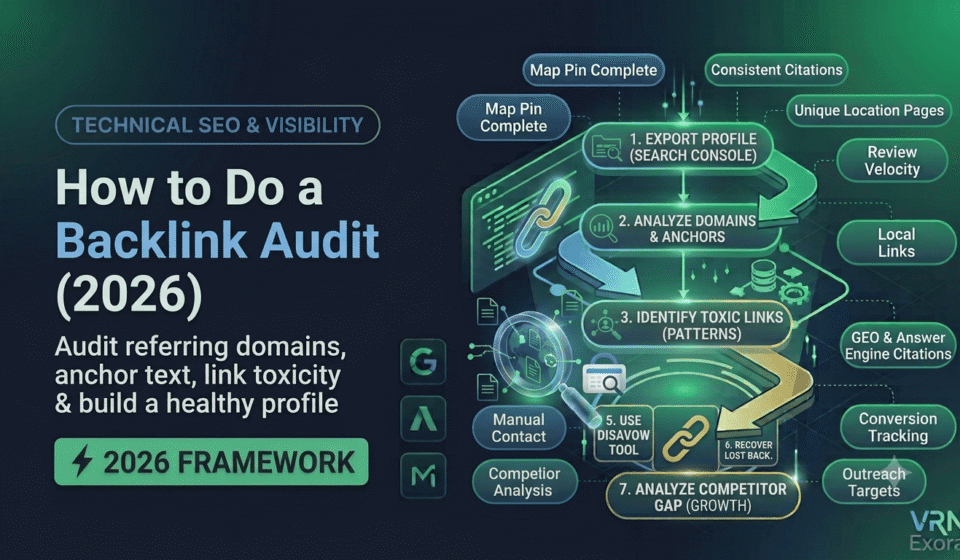

A backlink audit is a full review of every link pointing to your website, sorted by quality, checked for manipulation patterns, and turned into a clear plan for what to remove, recover, or build on. This guide is for site owners, SEO managers, and marketers who want a repeatable process rather than a one-time cleanup that gets forgotten. You will learn how to export a complete backlink profile, tell the difference between a genuinely harmful link and a link that only looks unusual, when the disavow tool actually belongs in the process, and how to turn the audit into ongoing link monitoring instead of a report nobody reopens.
What Is a Backlink Audit and Why Does It Matter?
A backlink audit is a systematic examination of every external link pointing to your site, evaluated for quality, relevance, and impact on your rankings. Most site owners have never actually reviewed their backlink profile, even though a large share of marketers consider backlinks a significant ranking factor. Left unchecked, profiles accumulate scraped directory links, blog comment spam, and links from expired or repurposed domains without anyone noticing until rankings start to slide.
The goal is not to hunt for a penalty that probably does not exist. For most sites, the goal is to confirm the profile is healthy, catch genuine manipulation early, and identify which link-earning content is already working so you can create more of it.
Step 1: Export Your Complete Backlink Profile
Every real backlink audit starts the same way: pulling a complete list of every link currently pointing at the site before making any judgment about quality. Use more than one source, since no single tool has a complete index of the web’s links. Pull data from the Links report inside Google Search Console, since this reflects exactly what Google itself has recorded, then supplement it with a dedicated backlink tool such as Ahrefs, Semrush, or Majestic for broader coverage.
Compile everything into one spreadsheet with columns for referring domain, target URL, anchor text, link type, and the metric your tool provides for domain authority. This becomes the working file for every step that follows.
Step 2: Analyze Referring Domains and Anchor Text
Sort your backlink profile by domain rating or authority to see your strongest referring sites first, then reverse the sort to review the weakest. Pay close attention to the referring domains report specifically, not just the raw backlink count, since the second and later links from the same domain carry far less value than the first one. A profile with five hundred backlinks from thirty domains is weaker than one with two hundred backlinks from a hundred and fifty different domains.
Review your anchor text distribution next. A natural profile has a healthy mix of branded anchors, naked URLs, generic phrases like “click here” or “read more,” and a smaller share of exact-match keyword anchors. A profile dominated by exact-match commercial anchors such as “buy [product] online” repeated across many links is a pattern Google associates with manipulation, not organic growth, and is worth flagging for closer review in the next step.
Step 3: Identify Toxic and Spammy Links
Not every unfamiliar or low-authority link is harmful, and Google is generally good at recognizing and simply ignoring low-quality links on its own without any action from you. What actually warrants attention are clear patterns of manipulation, including:
- Links from obvious link farms, expired domain networks, or private blog networks built purely to pass links
- Paid links that pass ranking credit without the required nofollow or sponsored attribute
- Excessive keyword-rich anchor text pointing at your homepage or money pages from unrelated, off-topic sites
- Widely distributed sitewide footer or widget links generated by a single template across hundreds of domains
- Links from hacked pages, sites hosting malware, or domains with clear spam signals elsewhere on the page
Most backlink tools provide a toxicity or spam score to help triage these candidates, but treat the score as a starting point for manual review, not a final verdict.
Step 4: Try Manual Removal Before Disavowing
Manually review every link flagged as potentially toxic before deciding what to do with it. A link from a small, off-topic blog is not automatically harmful just because it looks unfamiliar. Reserve action for links that clearly match the manipulation patterns above.
For links you do decide need to go, attempt removal by contacting the site owner directly and requesting the link be taken down, before reaching for the disavow tool. Manual removal is more effective and lower risk than disavowing, since a removed link is gone entirely rather than simply ignored, but it takes considerably more time and does not always get a response.
Step 5: Build a Disavow File Only When You Actually Need One
The disavow tool tells Google to ignore specific links when evaluating your site, but Google’s own guidance is clear that most sites never need it. John Mueller from Google has repeatedly stated that random spammy links usually do not require disavowing, since Google’s algorithms already discount them automatically. Reserve the disavow tool for situations like:
- A manual action in Search Console specifically citing unnatural links
- A known history of paid or manipulative link building from a previous agency or affiliate program that could trigger a future penalty
- A negative SEO attack at scale, where thousands of junk links appear in a short window and correlate with other spam signals
- Preparing a reconsideration request after a penalty, once manual removal attempts are documented
If your backlink profile looks messy in a third-party tool but your rankings and Search Console performance are stable, disavowing is very likely unnecessary and carries real risk if you accidentally disavow a legitimate link. If you do proceed, disavow at the domain level using the “domain:example.com” format for sites with many spammy links rather than disavowing individual URLs one at a time, and always upload the complete combined list each time, since a new upload replaces the previous one entirely rather than adding to it.
Step 6: Recover Lost High-Value Backlinks
While reviewing the profile, check for links you previously had that have since disappeared, often because a page was deleted, a site redesign dropped an internal reference, or a URL changed without a redirect. Losing a high-authority, relevant link is a quiet drain on rankings that most audits miss because the focus stays entirely on removing bad links rather than recovering good ones.
For lost links worth recovering, check whether the content simply moved to a new URL, in which case a redirect fixes it immediately, or reach out to the linking site directly if the reference was removed during a content update.
Step 7: Run a Competitor Backlink Gap Analysis
Pull your top-performing pages by referring domains to understand what already earns links in your niche, then compare your overall backlink footprint against two or three direct competitors who consistently outrank you. A gap analysis highlights domains that link to multiple competitors but not to you, which often represent the most realistic outreach targets, since they have already shown willingness to link to sites like yours.
Use this step to turn the audit from a purely defensive exercise into a growth plan. If a specific type of content, such as an original data study or a detailed how-to guide, consistently earns links across your competitors, that is a strong signal for what to prioritize in your own content plan.
How to Prioritize and Maintain a Healthy Backlink Profile
Rank your findings by real impact. A manual action or a confirmed negative SEO attack takes priority over everything else. Genuinely toxic, high-volume link patterns come next, followed by lost link recovery and competitor gap opportunities, which are lower urgency but higher long-term value.
Run the complete audit every three months rather than treating it as a one-time cleanup. Export fresh data, recheck toxicity flags, review any new links acquired since the last audit, and update your disavow file only if genuinely new manipulation has appeared. Set up backlink alerts in your SEO tool so sudden spikes or drops get caught within days rather than surfacing three months later at the next scheduled audit.
Frequently Asked Questions
How often should I run a backlink audit?
Every three months for most sites. Set up automated backlink alerts in between full audits so sudden spikes in spammy links or a drop in referring domains get caught quickly rather than waiting for the next scheduled review.
Do I need to disavow every toxic-looking link I find?
No. Google’s own guidance states that most spammy links are already ignored automatically and do not need disavowing. Reserve the disavow tool for confirmed manual actions, known historical link schemes, or large-scale negative SEO attacks.
What is the difference between link removal and disavowing?
Link removal means contacting the site owner and getting the link taken down entirely, which is more effective but slower and not always successful. Disavowing tells Google to ignore the link without removing it, which is faster but riskier if used on a link that was not actually harmful.
How many toxic backlinks does it take to hurt my rankings?
There is no fixed number. What matters more is the pattern, such as a concentrated cluster of exact-match anchors from unrelated domains or a sudden, unnatural spike in low-quality links, rather than the raw count of unfamiliar links in the profile.
Can a competitor hurt my rankings by building spammy links to my site?
Yes, this is known as a negative SEO attack, and it is one of the legitimate reasons to use the disavow tool. Look for a sudden, large spike in low-quality links appearing in a short window as the key warning sign.
Which tools do I need for a backlink audit?
Google Search Console’s Links report for a free, Google-verified baseline, plus at least one dedicated backlink tool such as Ahrefs, Semrush, or Majestic, since no single source has a complete index of every link on the web.
Get a Free Expert Review of Your Backlink Profile
Sorting genuinely harmful links from ones that only look unusual takes practice, and it is easy to either miss a real problem or overreact to a harmless one. If you want a faster starting point, get a free SEO audit from VRN Exora and see exactly where your backlink profile stands before you touch the disavow tool.