
Internal linking is the practice of hyperlinking one page on your own site to another, and it functions as the infrastructure that determines how both search engines and real visitors move through your site. This guide is for SEO managers, content teams, and site owners who have invested in good content but are not seeing it convert into rankings or traffic. You will learn the specific internal linking mistakes that quietly undermine otherwise strong content, why each one matters, and exactly how to fix it.
Why Internal Linking Deserves More Attention Than It Gets
Many teams prioritize backlinks over internal links, even though internal links are the one part of link building fully within your control. Backlinks depend on someone else’s decision to link to you. Internal links depend only on your own site structure and content decisions, which makes fixing internal linking mistakes one of the fastest, most reliable ways to improve how search engines crawl, understand, and rank your pages.
Internal links act as pathways for search engine bots to discover and index pages efficiently, and they shape how much authority flows from your strongest pages to the ones that need it most. When internal linking problems accumulate, key pages stop receiving link equity, the site’s structure becomes noisy, and search engines end up with a weaker understanding of what actually matters on the site, even if every individual page is well written.
Mistake 1: Orphaned Pages With No Internal Links Pointing to Them
An orphaned page is any page with no internal links pointing to it, which isolates it from the rest of the site’s navigation and structure. Search engine crawlers rely heavily on internal links for discovery, so an orphaned page is genuinely difficult for Google to find, crawl regularly, or understand as relevant. This is especially common in large product catalogs and content archives, particularly after a site update, category restructuring, or content migration leaves a batch of pages disconnected from the rest of the site.
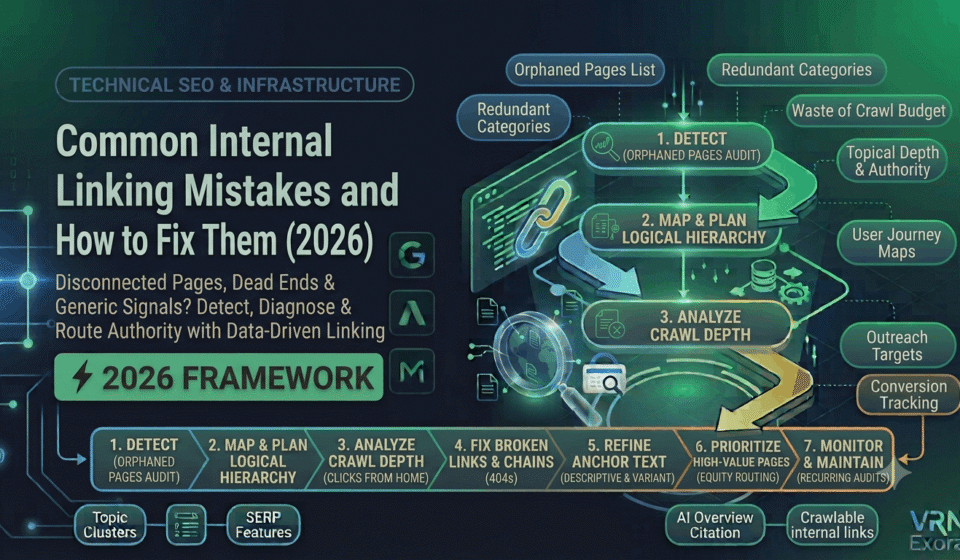
The fix: Run a site audit with a crawler like Screaming Frog or Semrush’s Site Audit tool to identify orphaned pages, since these are typically found by comparing your full URL list against the pages your crawler actually reaches through links. Add relevant internal links from related content, category pages, or navigation elements to every orphaned page worth keeping, and consider removing or consolidating pages that no longer serve a real purpose.
Mistake 2: Broken Internal Links and Redirect Chains
Broken internal links create a poor user experience and waste crawl budget, signaling to search engines that the site is not well maintained. This becomes a genuine, ongoing problem at scale, particularly when multiple teams or departments manage different sections of a site independently, since outdated links and broken redirects slip through the cracks without anyone noticing until traffic reports show the drop.
The fix: Conduct frequent, automated internal link audits rather than a single one-time cleanup, and set up a monitoring system to catch 404 errors as they appear. When you find a broken link, update it to point to the correct current URL, or set up a proper redirect if the destination page has genuinely moved. Collapse any redirect chains down to a single hop rather than leaving multiple redirects stacked on top of each other.
Mistake 3: Excessive Crawl Depth for Important Pages
Crawl depth refers to how many clicks it takes to reach a page starting from the homepage. If it takes five or six clicks to reach a page you consider important, that page is signaling low priority to search engines regardless of how good its content actually is, and it is also genuinely harder for real visitors to find through normal browsing.
The fix: Map your site’s current click depth for high-priority pages and restructure navigation, category pages, or contextual in-content links so your most important content sits within two or three clicks of the homepage. This often means adding links from high-traffic pages or navigation menus directly to deeper pages that deserve more visibility than their current position provides.
Mistake 4: Generic or Vague Anchor Text
Anchor text like “click here” or “read more” fails to tell either users or search engines anything about what the linked page actually contains. This is one of the most frequently cited internal linking mistakes precisely because it is so easy to default to without thinking, especially when content is written quickly or by multiple contributors without a shared standard.
The fix: Use descriptive anchor text that reflects the actual topic of the destination page, written in plain language clear enough that a reader knows what they will find before clicking. A practical rule is that anchor text should make the linked page’s topic obvious on its own, without requiring the reader to click through to find out.
Mistake 5: Repeating the Same Exact-Match Anchor Text Everywhere
The opposite mistake also causes problems: using the identical exact-match keyword-rich anchor text for every internal link pointing to the same page, or reusing that same anchor text across links pointing to entirely different pages. This creates an unnatural, over-optimized pattern that can confuse the specific relevance signal internal links are meant to provide.
The fix: Vary anchor text naturally across different links pointing to the same destination, using close variations and related phrases rather than the identical exact-match string every time, and avoid using the same anchor text for links pointing to different, unrelated pages.
Mistake 6: Linking to Irrelevant or Contextually Unrelated Pages
A common mistake once basic hierarchy and anchor text are handled is linking to pages that do not actually fit the surrounding context, either because a template inserts the same set of links regardless of the page’s actual topic, or because a writer links opportunistically to a page that only loosely relates to what the content is actually about.
The fix: Review internal links for genuine topical relevance rather than convenience, and prioritize links that would make sense to a reader following the logic of the content, not just links that exist because a related page happened to be available. Contextual, topically relevant links carry a stronger signal than links inserted purely for volume.
Mistake 7: No Logical Site Hierarchy or Taxonomy
Internal linking works best as a byproduct of a clear, hierarchical site structure, where broad category or hub pages link down to more specific subpages, and those subpages link back up to reinforce the hierarchy. Sites that grow organically without deliberate taxonomy planning often end up with a flat, disorganized link structure that gives search engines little sense of which pages are foundational and which are supporting detail.
The fix: Build or restore a logical, hierarchical link structure that groups related content under clear hub pages, and make sure every subpage links back to its relevant hub. This reinforces topical depth for search engines and makes the overall site far easier for both crawlers and real visitors to navigate.
Mistake 8: Failing to Prioritize Links to High-Value Pages
Not every page deserves equal internal linking attention, but many sites treat linking as an afterthought applied evenly and thinly across the whole site rather than deliberately concentrated on the pages that matter most for rankings or conversions.
The fix: Identify your highest-value pages, the ones that convert, rank for competitive terms, or anchor an important topic cluster, and deliberately route more internal links and stronger anchor text toward them from relevant supporting content across the site. This mirrors how link equity from external backlinks should be prioritized, applied instead to the links fully within your control.
How to Audit and Fix Internal Linking at Scale
Fix technical blockers first, meaning broken links, redirect chains, and orphaned pages, since these prevent your most important pages from even being reliably crawled and indexed before anchor text or hierarchy improvements can matter. Once the technical foundation is solid, move to structural improvements like crawl depth and hierarchy, and finish with anchor text and contextual relevance refinements.
Build a content inventory as the starting point for any large-scale internal linking project, since it is difficult to fix linking gaps without first knowing exactly which pages exist, which ones are currently connected, and which ones deserve more link equity than they are currently receiving. Treat this as recurring maintenance rather than a one-time project, since new content, site updates, and page removals all continuously reshape the internal link graph.
Frequently Asked Questions
What is the most damaging internal linking mistake?
Technical issues like broken links, redirect chains, and orphaned pages tend to be the most detrimental, since they prevent search engines from even reliably reaching and indexing important pages, which undermines everything else, including good content and strong anchor text.
How do I find orphaned pages on my site?
Run a crawl with a tool like Screaming Frog or Semrush’s Site Audit and compare the full list of URLs on your site against the pages the crawler actually discovers through internal links. Any URL not reached through a link is effectively orphaned.
Is it bad to use the same anchor text for every internal link to a page?
Repeating identical exact-match anchor text across many links can create an unnatural, over-optimized pattern. Varying the anchor text naturally with related phrases while keeping it descriptive is a safer, more effective approach.
How many clicks should it take to reach an important page from the homepage?
Two to three clicks is a reasonable target for genuinely important pages. Pages buried five or six clicks deep signal low priority to search engines and are also harder for real visitors to find through normal browsing.
Should every page on a site have internal links pointing to it?
Nearly every page worth keeping should have at least one relevant internal link pointing to it. A page with no internal links, an orphaned page, is difficult for search engines to discover and rank, regardless of how strong its content is.
How often should internal linking be audited?
Regularly rather than as a one-time project, since new content, site restructuring, and page removals continuously reshape the internal link graph. Automated, recurring audits catch broken links and orphaned pages before they accumulate into a larger problem.
Get a Free Expert Review of Your Internal Linking
Fixing internal linking issues at scale takes a clear system, not just spot-checking a few pages. If you want a faster starting point, get a free SEO audit from VRN Exora and see exactly which internal linking gaps are costing your site visibility.