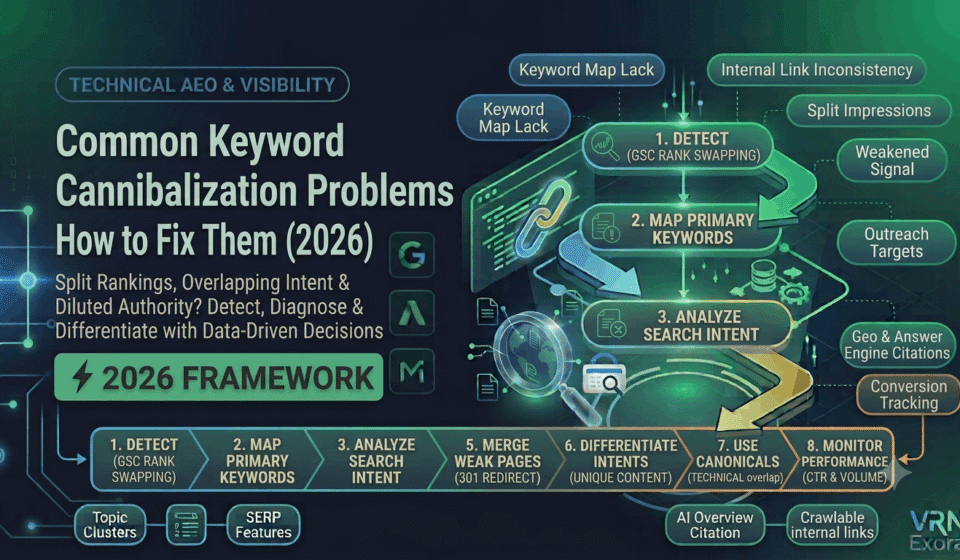

Keyword cannibalization happens when two or more pages on the same site target the same keyword or search intent, splitting ranking signals between them instead of concentrating authority on one strong page. This guide is for SEO managers, content teams, and site owners who suspect their own pages might be competing against each other rather than against outside competitors. You will learn the specific patterns that cause cannibalization, how to confirm it is actually happening rather than assuming, and the right fix for each situation, whether that means merging, redirecting, or simply leaving two pages exactly as they are.
What Keyword Cannibalization Actually Is, and Isn’t
Cannibalization is not simply having two pages that mention the same topic. Pages naturally rank for a wide range of related terms, and overlap on its own is normal and often harmless. A real cannibalization problem exists only when multiple pages compete for the same primary keyword and that competition is actively hurting overall organic performance, not just when two pages happen to cover similar ground.
This distinction matters because chasing every instance of topical overlap wastes time on pages that were never actually a problem. The right question is not “do these pages overlap,” it is “would combining or clearly differentiating these pages produce more total organic traffic than leaving them as they are.”
Problem 1: Publishing Without a Keyword Map
The most common root cause of cannibalization is simple: nobody assigned a single, clear primary keyword to each URL before it was published. Over months or years, this results in several posts loosely covering the same territory from slightly different angles, each one written without visibility into what the others were already targeting.
The fix: Maintain a living keyword map, a spreadsheet or document assigning one primary target keyword to every URL on the site, and check new content ideas against it before writing begins. This single habit prevents the majority of cannibalization issues before they ever have a chance to develop.
Problem 2: Refreshing Old Content That Overlaps With Newer Pages
Content refreshes are a common, less obvious source of cannibalization. A team updates an older post to keep it current, expands its scope to cover more ground, and unintentionally creates direct overlap with a newer page that was built specifically to target a related but distinct query.
The fix: Before refreshing any existing page, check the keyword map for other pages already targeting adjacent terms, and scope the refresh narrowly enough to avoid duplicating what a separate page already owns. If the overlap already exists from a past refresh, treat it the same as any other cannibalization case rather than assuming it is a special exception.
Problem 3: Weak Internal Linking That Fails to Signal a Primary Page
When several pages target similar terms, internal linking is one of the clearest signals available for telling Google which page you actually consider primary. If internal links point inconsistently to different competing pages, or worse, if the stronger, more authoritative page receives fewer internal links than a weaker competing one, that signal actively works against the outcome you want.
The fix: Audit internal links pointing to any set of competing pages and redirect the bulk of that link equity toward the page you have decided should win. Update anchor text across the site to consistently point to the intended primary page, rather than splitting links evenly across multiple competing URLs.
Problem 4: Rank Swapping Between Two URLs
One of the clearest and most reliable signs of active cannibalization is rank swapping, where the same keyword alternates between two of your own URLs from one reporting period to the next, sometimes even day to day. This happens because Google itself cannot consistently determine which of your pages is the most relevant answer to that query, so it keeps testing both.
The fix: In Google Search Console’s Performance report, filter by the suspected keyword and check the Pages tab for meaningful impressions split across more than one URL. If the ranking URL keeps switching between two specific pages, that is a strong, reliable signal that a real fix, not just topical overlap, is needed.
Problem 5: Split Link Equity Across Competing Pages
Backlinks and internal link equity that should concentrate on a single strong page instead get spread across multiple competing URLs. Rather than one page accumulating enough authority to genuinely compete for a difficult keyword, several pages each accumulate a smaller, insufficient share, and none of them ends up strong enough to rank as well as a single consolidated page would.
The fix: Identify which of the competing pages already holds the most inbound links, the broadest existing organic visibility, and the strongest historical traffic, and treat that page as the consolidation target for the other steps in this process. Attempting to strengthen all competing pages equally rarely resolves the underlying dilution.
Problem 6: CTR and Intent Mismatch From the Wrong Page Ranking
When Google alternates between two competing pages, it sometimes surfaces the weaker one, a version with a less compelling title, a worse meta description, or content that only partially matches what the searcher actually wanted. When this happens, click-through rate drops, and a sustained CTR drop tends to further suppress rankings over time, compounding the original problem.
The fix: Once you have identified which page should be ranking, make sure its title tag, meta description, and on-page content most directly and completely match the query’s actual intent, so that when Google does settle on the correct page, it performs as well as it should.
How to Confirm You Actually Have a Cannibalization Problem
Before merging or redirecting anything, confirm the problem is real using data rather than assumption. Start with Google Search Console, since it shows genuine impression and click data rather than an estimate. Filter the Performance report by the suspected keyword and check whether two or more URLs are receiving meaningful impressions for it, then watch which URL Google actually surfaces over several weeks. If it keeps switching, that is a strong signal.
A quick manual check can supplement this: search site:yourdomain.com "target keyword" directly on Google and review which of your own pages appear and in what order. For a more thorough analysis across a large site, a dedicated SEO tool’s cannibalization report can surface patterns across dozens of keywords at once rather than checking one at a time.
How to Fix It: Merge, Redirect, Canonicalize, or Differentiate
Once cannibalization is confirmed, the right fix depends on the specific situation, not a single universal rule.
| Situation | Recommended fix |
|---|---|
| Two weak, overlapping pages that would perform better as one | Merge the strongest content from both into a single page, then 301 redirect the weaker URL to the merged page |
| Duplicate or near-duplicate pages with no reason to keep both live | Remove all but the strongest version, based on inbound links, existing visibility, and traffic, and redirect the rest |
| Pages that serve genuinely distinct sub-intents within the same broad topic | Differentiate them clearly with distinct titles, angles, and target keywords rather than merging |
| Pages with unavoidable technical duplication, such as parameter or filter URLs | Apply a canonical tag pointing to the version you want indexed |
When merging, genuinely combine the strongest, most useful content from each page rather than simply picking one and deleting the other, since the merged page needs to be more complete than either original was alone. Update every internal link that previously pointed to the removed page so it points directly to the surviving one, rather than relying on the redirect alone to carry that signal forward. Treat canonical tags and redirects as a last resort for cases that genuinely require them, since preventing cannibalization from happening in the first place is consistently easier than fixing it after the fact. You can also use a website for free SEO audit to identify potential technical and on-page issues that may contribute to keyword cannibalization.
How to Prevent Cannibalization Going Forward
The best time to solve cannibalization is before it happens. Keep the keyword map current and check it as a required step before publishing any new page, not as an optional habit that gets skipped under deadline pressure. Build content in clusters with a clear hierarchy, where one comprehensive page owns the primary keyword and supporting pages target genuinely distinct, related subtopics that link back to that primary page rather than competing with it.
Revisit the keyword map periodically, particularly after content refreshes or a batch of new publishing, since cannibalization tends to develop gradually rather than appearing all at once. Catching early overlap during a quarterly content review is considerably less disruptive than untangling a fully established rank-swapping problem months later.
Frequently Asked Questions
Is having two pages about a similar topic always a cannibalization problem?
No. Pages naturally rank for a wide range of related terms, and topical overlap alone is not automatically harmful. A real problem exists only when multiple pages are actively competing for the same primary keyword in a way that is measurably hurting overall organic performance.
What is the clearest sign of active keyword cannibalization?
Rank swapping, where the same keyword alternates between two of your own URLs in Google Search Console’s Performance report from one period to the next, is generally considered the most reliable indicator.
Should I always merge cannibalizing pages?
Not always. Merging works well when both pages are weak and overlapping, but if the pages actually serve distinct sub-intents within a broader topic, clearly differentiating them with distinct angles and keywords is often the better fix.
Will a 301 redirect fully transfer the SEO value of the removed page?
A 301 redirect passes most of the ranking signal to the destination page, but updating internal links that pointed to the old URL to point directly at the new one strengthens that transfer rather than relying on the redirect alone.
Can keyword cannibalization happen on a small website?
Yes, though it is more common and often more damaging on larger sites and ecommerce stores with many similar product or category pages, where the sheer number of near-duplicate URLs makes accidental overlap far more likely.
How often should I check for cannibalization?
A quarterly review of the keyword map alongside Search Console data catches most cases early, though it is also worth checking specifically after any content refresh or batch of new content that touches an existing topic area.
Get a Free Expert Review of Your Content
Finding real cannibalization issues versus normal topical overlap takes practice with the data. If you want a faster starting point, get a free SEO audit from VRN Exora and see exactly which pages on your site are actually competing against each other.