
An indexing issue in Google Search Console means a page exists on your site but is missing from Google’s index entirely, which makes it invisible in search results no matter how well the content or backlinks might otherwise perform. This guide is for site owners, SEO managers, and marketers who have opened the Page indexing report, seen a wall of grey status labels, and were not sure which ones actually need fixing. You will learn what each common status genuinely means, the real causes behind each one, and the specific steps to resolve them, plus how to tell a normal, expected exclusion from a real problem worth investigating.
Why Indexing Issues Deserve Priority
Indexing sits below rankings in the diagnostic order for a reason. Google cannot rank a page it has not indexed, which means any time spent optimizing content or building links to an unindexed page produces zero return until the indexing issue itself is resolved. For many sites in 2026, this is a larger problem than most teams assume, with some analyses finding that forty to sixty percent of a site’s pages can sit unindexed, and in the majority of cases this is not a technical bug but a quality or crawl priority signal.
Unindexed pages carry a second cost that did not exist a few years ago. Google’s AI Overviews now appear on a meaningful share of all searches, and because AI Overviews draw exclusively from indexed content, a page that never makes it into the index also has zero chance of being cited in an AI-generated answer, regardless of how well written it is.
Discovered, Currently Not Indexed
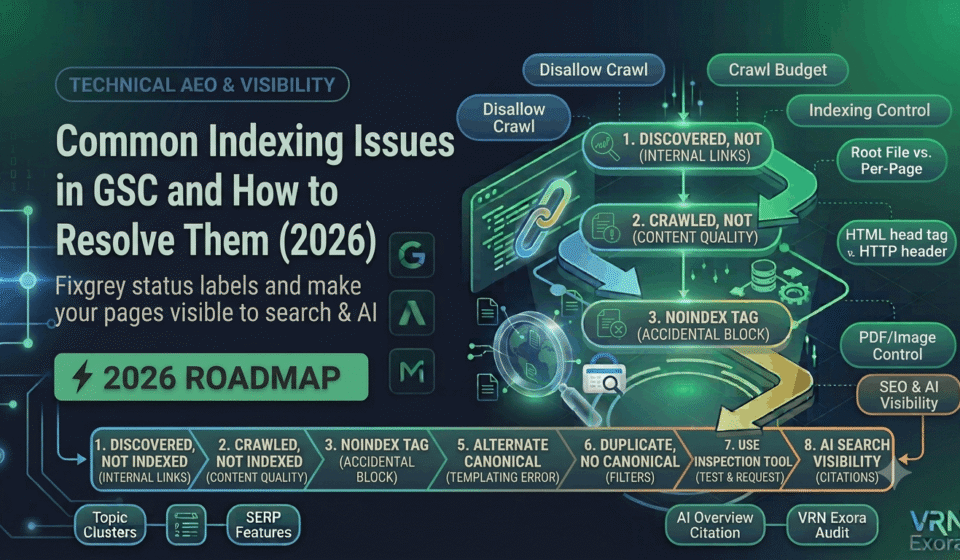
This status means Google knows the URL exists, typically through a sitemap or an internal link, but has not actually crawled it yet. According to Google’s own guidance, this commonly happens because Google wanted to crawl the URL but determined doing so risked overloading the site, so the crawl was rescheduled for later, which is why the last crawl date on this status is often empty.
The underlying causes are usually one of a few patterns: low internal page authority, meaning too few internal links point to the page to signal it is worth prioritizing, server performance issues that slow down or limit how much Google can crawl in a session, or a large site where crawl budget is simply being spent elsewhere first. Before investigating deeply, confirm the report is current, since Search Console data can lag behind reality and the page may already be indexed by the time you check.
How to fix it: Strengthen internal links pointing to the affected page from higher-authority pages elsewhere on the site, confirm the page is included in your XML sitemap, and check server response times and error rates for signs of overload during Google’s typical crawl windows. Compare the count of affected URLs against your total important page count, since a small number on low-value pages is often normal crawl scheduling, while a large or growing cluster concentrated on pages you actually need indexed is a stronger signal something structural needs attention.
Crawled, Currently Not Indexed
This status means Google actually visited and parsed the page, then made a deliberate decision not to add it to the index. Unlike the discovered status, this is not a crawl scheduling issue, it is a quality or relevance judgment, which makes it both more common and, in a specific sense, more informative about what needs to change.
The most frequent causes are thin content that does not sufficiently answer the query it is meant to target, duplicate or near-duplicate content that overlaps heavily with another indexed page, weak internal linking that fails to signal the page’s importance, or a genuine mismatch between the page’s content and the search intent it was built for. This is generally considered the most common cause and the hardest to fix, but also the most impactful to address once identified.
How to fix it: Compare the affected page directly against the top three to five ranking results for its target keyword and ask honestly whether it fully answers the same question those pages do. If the page serves a legitimate secondary purpose, such as internal navigation or account access, but was never meant to rank, add a deliberate noindex tag rather than leaving it in this status indefinitely. If it was meant to drive traffic but genuinely cannot compete on quality, consolidate it into a stronger, more complete page instead of trying to improve it in isolation.
Excluded by ‘noindex’ Tag
This status means a page carries an explicit instruction, either a meta robots noindex tag or an X-Robots-Tag HTTP header, telling Google not to index it. Sometimes this is entirely intentional, such as on a thank-you page or an internal search results page, and requires no action at all.
How to fix it: The only real risk here is an accidental noindex tag on a page that should rank, often left over from a staging environment that got pushed to production, or a CMS or plugin setting applied incorrectly across an entire section of the site. Review every URL in this status that you actually want indexed and remove the directive, then use the URL Inspection tool to request re-indexing once the tag is gone.
Page With Redirect
This status appears when a URL redirects to another destination, and since a redirected URL is not itself the final destination, Google does not index it separately. This is expected and correct behavior for old URLs pointing to a current, live page.
How to fix it: Confirm the redirect target is actually the intended, live page rather than an outdated or broken destination left over from a previous site change. If a redirect chain is involved, meaning the URL redirects to another redirect before finally landing on a live page, collapse it to a single hop, since chains waste crawl budget and can dilute the signal passed to the final destination.
Alternate Page With Proper Canonical Tag
This status means Google is indexing a different URL that you have designated as the canonical version through a canonical tag, and it is generally working as intended. Problems arise when the canonical target was set incorrectly, often through a templating error that applies the same canonical value across pages that should each be indexed independently.
How to fix it: Spot-check a sample of URLs in this status to confirm the canonical target is genuinely the correct, intended version of that content. Pay particular attention to paginated pages and filtered category pages, since self-referencing canonicals are usually correct there, while a canonical incorrectly pointing back to page one of a paginated series can quietly remove later pages from the index entirely.
Duplicate Content Without a User-Selected Canonical
This related status shows up when Google finds several near-identical pages and cannot determine which one you intend as the primary version, so it selects one automatically, which is not always the page you would have chosen yourself.
How to fix it: Add an explicit canonical tag on every page in the duplicate cluster pointing to the version you actually want indexed, and where the duplication comes from filter or parameter URLs, extend the fix to your URL structure or robots rules so the pattern does not keep regenerating new duplicate clusters going forward.
How to Use the URL Inspection Tool to Confirm a Fix
After making any fix, use the URL Inspection tool directly on the affected URL rather than waiting for the Page indexing report to update, since that report can lag behind the current state by several days. Select Test Live URL, then review the rendered screenshot to confirm Googlebot sees the actual finished page rather than a blank loading state, which is a common issue on JavaScript-heavy sites where content renders after the initial page load.
Once you have confirmed the live version looks correct, submit a request for indexing through the same tool. This does not guarantee indexing on its own, Google still evaluates the page against its usual quality and relevance signals, but it does prompt a faster recrawl than waiting for natural crawl scheduling to reach the page again.
When Indexing Issues Are Normal, and When to Worry
Not every excluded URL represents a problem to solve. For most sites, having roughly five to fifteen percent of crawled pages sitting in a not-indexed status is common and not alarming, particularly when the affected pages are utility pages like login screens, shopping carts, or thin pagination and archive pages that were never meant to rank on their own.
Investigate further when the affected share climbs past twenty to thirty percent of your actual content pages, when the trend is clearly rising over recent weeks rather than holding steady, or when the pattern concentrates specifically on pages you genuinely need indexed rather than spreading evenly across low-value utility URLs. Make reviewing the Page indexing report a weekly habit rather than an occasional check, since indexing problems left unaddressed tend to compound and become considerably more expensive to fix once they have persisted for months.
How Indexing Affects AI Search Visibility Too
Because AI-generated answers draw from indexed content, an indexing problem is no longer just a traditional search issue. If your pages are not indexed, most AI systems cannot discover or cite them either. A practical way to sense-check this is to directly query ChatGPT, Perplexity, or another AI assistant about topics your unindexed pages cover, and if your brand is absent from those answers, it is a reasonable signal that the same underlying indexing and quality issues are affecting both traditional search and AI visibility at once.
Frequently Asked Questions
What is the difference between Discovered and Crawled, currently not indexed?
Discovered means Google knows the URL exists but has not crawled it yet, usually due to crawl budget or server load. Crawled means Google visited the page and made a deliberate decision not to index it, usually due to thin, duplicate, or low-relevance content.
How many pages are normal to have unindexed?
Roughly five to fifteen percent of crawled pages sitting outside the index is common for most sites, especially when those pages are utility pages, pagination, or thin archive pages. Anything above twenty to thirty percent of genuine content pages, or a clearly rising trend, is worth investigating further.
Does clicking Request Indexing guarantee a page will get indexed?
No. It prompts Google to recrawl the page sooner than it otherwise might, but Google still evaluates it against the same quality and relevance signals. If the underlying issue causing the exclusion has not been fixed, the page will typically remain unindexed after the recrawl.
Can a robots.txt block cause a “currently not indexed” status?
Not directly in the same way. Pages blocked entirely by robots.txt usually show a different, distinct status since Google cannot crawl them at all, whereas “currently not indexed” statuses specifically mean Google was able to reach or discover the URL.
Should I noindex utility pages like login or cart pages?
If those pages have no search value and are only appearing in the report as normal, expected exclusions, adding an explicit noindex tag can clean up your Page indexing report without any negative impact, since they were never meant to rank in the first place.
How often should I check the Page indexing report?
Weekly for most active sites. Indexing issues that go unnoticed tend to compound over time, and catching a rising trend early is considerably easier to fix than addressing a problem that has persisted for months.
Get a Free Expert Review of Your Indexing Health
Diagnosing which indexing issues actually matter takes practice, and it is easy to spend time on a normal exclusion while a real problem goes unnoticed. If you want a faster starting point, get a free SEO audit from VRN Exora and see exactly which indexing issues on your site are worth fixing first.