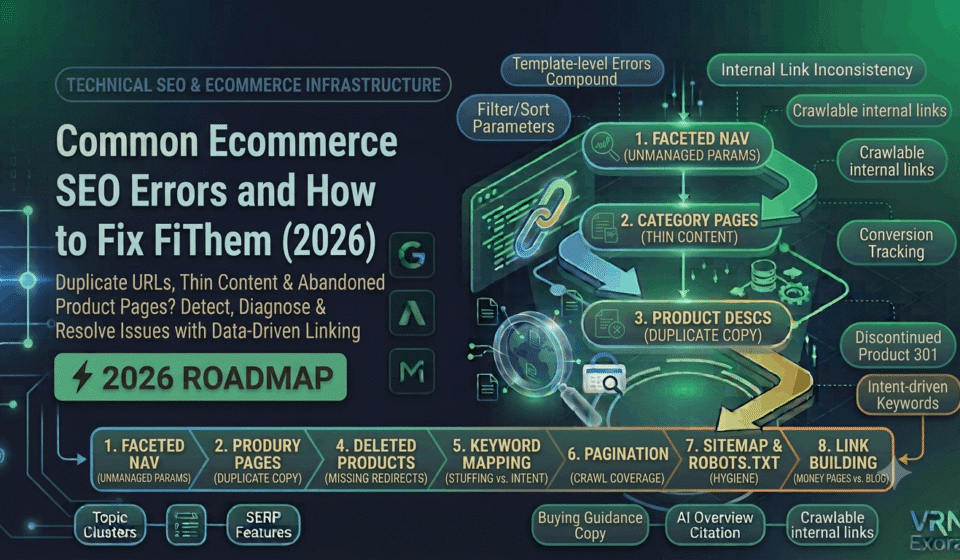

Ecommerce SEO mistakes tend to compound faster than on other types of sites, because a single template-level error repeats across thousands of product and category pages instead of staying contained to one URL. This guide is for store owners, ecommerce marketers, and SEO managers who want to know exactly which mistakes are quietly costing traffic and revenue, and how to fix each one at the scale an online store actually requires. You will learn the most common technical, content, and off-page mistakes specific to ecommerce, why they happen, and the concrete steps to correct them.
Why Ecommerce SEO Mistakes Compound Faster
Most ecommerce SEO mistakes are not isolated errors, they are template problems. A store with five hundred products can easily generate fifty thousand indexable URLs once filters, sort orders, and product variants are accounted for, and every one of those URLs inherits whatever mistake exists in the underlying template. This means a single fix, applied once at the template level, can resolve an issue across an entire catalog at once, but it also means a single oversight can quietly damage performance across the whole store before anyone notices.
Mistake 1: Unmanaged Faceted Navigation Creating Duplicate URLs
This is the most common and most damaging ecommerce SEO mistake. Ecommerce platforms generate a unique URL for nearly every filter combination and sort order by default, so selecting a size and color filter, or sorting by price, creates a new indexable page with content nearly identical to the base category page. A store with a modest catalog can easily end up with tens of thousands of near-duplicate URLs competing against each other and against the actual category page they were filtered from.
The fix: Use robots meta tags or robots.txt rules to prevent filter and sort parameter URLs from being indexed, and configure URL parameter handling in Search Console to clarify which parameters genuinely change page content, such as a category filter, versus which ones do not, such as sort order. Double-check that product links from category pages point to the canonical product URL rather than a filtered variant, since this specific error is especially common on Shopify sites and silently splits ranking signals across duplicate versions of the same page.
Mistake 2: Treating Category Pages as an Afterthought
Category pages are frequently built as nothing more than a title, a filter bar, and a product grid, with no supporting content explaining what the category actually offers. This is a significant missed opportunity, since category pages target exactly the kind of broad, high-volume commercial queries, like “men’s running shoes” or “organic baby skincare,” that carry substantial search demand. A page with no context gives search engines nothing to understand its topical relevance from, and gives shoppers no reason to trust the store over a competitor.
The fix: Add original, genuinely useful copy to every primary category page, commonly fifty to one hundred words of immediate context above the product grid and a longer section of two hundred to five hundred words below it covering buying guidance and related long-tail terms. This is frequently one of the fastest available wins in ecommerce SEO, sometimes producing a meaningful traffic increase without touching a single product page or building any new backlinks.
Mistake 3: Thin or Copy-Pasted Product Descriptions
Product pages using manufacturer-supplied descriptions, or descriptions so brief they add no real information beyond a title and a price, give search engines nothing to differentiate that page from dozens of competitors selling the identical product. This mistake compounds specifically on ecommerce sites because the same thin or duplicated description often gets reused word for word across every size and color variant of the same item.
The fix: Write unique, keyword-relevant product descriptions that genuinely cover features, benefits, and the specific questions buyers ask before purchasing, supported by high-quality images, customer reviews, and technical specifications where relevant. Prioritize this work on your highest-traffic and highest-margin products first, since rewriting an entire catalog at once is rarely realistic.
Mistake 4: Deleting Product Pages Without Redirecting Them
Every product page that has ever ranked, been linked to, or accumulated organic traffic carries real SEO value, and deleting it without a plan throws that value away entirely. For a broader strategy, see our guide on Optimize Product Pages for AI Search. This is a particularly easy mistake to make with seasonal or discontinued products, where a team removes the page the moment the item is out of stock without considering what happens to the traffic, links, and rankings that page had already earned.
The fix: If the product is temporarily out of stock but expected to return, keep the page live, mark it clearly as out of stock, and link to closely related alternatives rather than removing it. If the product is discontinued permanently, set up a 301 redirect to the most relevant category page or a genuinely comparable replacement product, rather than letting the URL return a dead end or a generic 404.
Mistake 5: Keyword Stuffing and Poor Keyword Mapping
Overusing target keywords within product content, meta tags, or URLs in an attempt to manipulate rankings makes content sound forced and repetitive, and search engines now actively discount this outdated tactic rather than rewarding it. The related but distinct mistake is poor keyword research from the start, targeting broad, highly competitive terms that rarely convert instead of the more specific, intent-driven queries buyers actually use when ready to purchase.
The fix: Base keyword targeting on genuine commercial and transactional intent rather than volume alone, group keywords by theme and buyer journey stage, and assign each one to the single most relevant page rather than repeating the same term unnaturally across product copy. Write for the buyer’s actual question first, and let the natural language of a genuinely helpful answer carry the keyword relevance rather than forcing it in.
Mistake 6: Broken Pagination and Incomplete Crawl Coverage
On category pages with large inventories, search engines cannot always efficiently discover every paginated page by following only the sequential links at the bottom of the page, since many pagination systems only expose links to the next few pages in the series rather than the full range. This means products sitting several pages deep in a large category can go effectively undiscovered by crawlers even though they are technically linked somewhere on the site.
The fix: Implement canonical tags correctly across paginated series to avoid indexing confusion, and confirm your pagination structure gives crawlers a genuine, reasonably direct path to every page in a large category, not just the first few. Whether the store uses classic pagination or infinite scroll, the underlying requirement is the same: Google needs a reliable way to reach every product, not only the ones visible on the initial page load.
Mistake 7: Ignoring Sitemap and Robots.txt Hygiene
Errors in XML sitemaps or robots.txt configuration can quietly exclude important product or category pages from being discovered by search engines at all, while simultaneously failing to block the truly irrelevant pages, like admin sections or raw filter parameter URLs, that should never have been indexed in the first place.
The fix: Generate a complete XML sitemap covering all relevant product, category, and blog pages, update it whenever site structure changes, and resubmit it through Search Console. Configure robots.txt to explicitly block irrelevant or duplicate pages, such as admin routes and filter parameters, while explicitly allowing full access to every section that actually needs to be indexed.
Mistake 8: Building Links Only to the Blog, Never to Money Pages
Many stores invest in link building exclusively for blog content while leaving category and product pages, the pages that actually generate revenue, with essentially no backlink profile of their own. Without external signals pointing to these commercial pages, Google has considerably less reason to treat them as trustworthy or authoritative compared to a competitor’s equivalent page that has earned genuine external links.
The fix: Deliberately prioritize a portion of link building effort toward category and product pages, not just blog content, through tactics like data-driven guides that naturally link back into relevant collections, or through digital PR that references specific product lines. Competitor gap analysis can help identify realistic link targets already linking to comparable commercial pages elsewhere in your niche.
How to Prioritize Fixes Across a Large Catalog
Fix template-level technical issues first, since faceted navigation, sitemap, and robots.txt problems affect every page built on the same template simultaneously, which makes them the highest-leverage fixes available on any ecommerce site. Move next to your highest-traffic and highest-revenue category and product pages for content improvements, rather than attempting a uniform rewrite of the entire catalog at once, since a smaller set of genuinely strong pages will outperform a large set of mediocre ones.
Ecommerce SEO is genuinely never finished. New products, seasonal changes, and platform updates continuously introduce fresh instances of these same mistakes, so treat this as a recurring quarterly review rather than a one-time cleanup, with particular attention to any new product template or filter system introduced since the last audit.
Frequently Asked Questions
What is the single most damaging ecommerce SEO mistake?
Unmanaged faceted navigation is generally considered the most damaging, since it can generate tens of thousands of near-duplicate URLs from filters and sort orders, wasting crawl budget and diluting ranking signals across an entire catalog at once.
Should I delete a product page once the item is discontinued?
Not without a plan. If the product may return, keep the page live and mark it out of stock. If it is discontinued permanently, set up a 301 redirect to a relevant category or comparable product rather than deleting the page outright, since it may still carry real traffic, links, and ranking value.
How much content should a category page actually have?
A common effective pattern is fifty to one hundred words of context above the product grid and two hundred to five hundred words of buying guidance and related content below it, giving search engines and shoppers genuine information rather than just a filter bar and a grid of products.
Do product pages need unique descriptions for every variant?
Yes, ideally. Reusing the identical description across every color or size variant of the same product creates internal duplicate content that weakens all versions rather than strengthening any single one.
Should link building focus only on blog content for an ecommerce site?
No. Category and product pages generate the actual revenue and deserve a deliberate share of link building effort too, since a purely blog-focused backlink profile leaves the commercial pages that matter most without the authority signals that would help them compete.
How often should an ecommerce SEO audit be repeated?
Quarterly is a reasonable standard for most stores, since new products, seasonal changes, and platform updates continuously introduce new instances of the same recurring mistakes.
Get a Free Expert Review of Your Store
Catching template-level mistakes before they spread across an entire catalog takes a systematic review. If you want a faster starting point, get a free SEO audit from VRN Exora and see exactly which ecommerce SEO issues are costing you traffic and revenue.