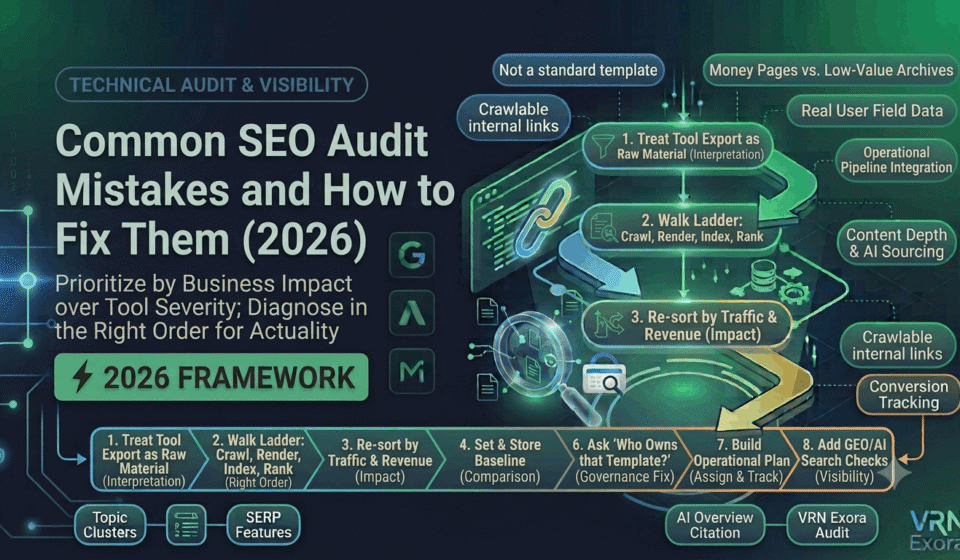

An SEO audit only creates value if it changes what happens next, and most of them do not, not because the data collected is wrong, but because of how that data gets interpreted, prioritized, and handed off. This guide is for SEO managers, agencies, and site owners who have sat through an audit with a hundred flagged issues and still were not sure what to do first. You will learn the specific mistakes that quietly turn a technically accurate audit into a document nobody acts on, and exactly what to do differently at each step.
Why Most SEO Audits Fail to Produce Results
An SEO audit is supposed to replace the overwhelming complexity of a real website with a clear, prioritized story about what matters most. Instead, most audits do the opposite. It is common to see reports with over a hundred issues flagged across crawlability, indexing, performance, and structured data, where nearly everything is labeled important and nothing is clearly first. Teams then either freeze under the weight of the list or default to fixing whatever is easiest to check off, regardless of whether it moves any real metric.
The mistakes below are not really about missing technical knowledge. They are about process, and every one of them is fixable once you know to look for it.
Mistake 1: Treating a Tool Export as the Audit
The most common and least useful version of an audit is a raw export from Screaming Frog or Semrush, lightly rebranded and delivered as a finished report. The tool itself is not the problem, it is genuinely excellent at surfacing issues. The problem is the absence of interpretation. Without someone connecting those flagged issues to root causes and actual business impact, the report stays a list of red and yellow warnings with no real priorities behind it.
The fix: Treat the crawl export as raw material, not the deliverable. Every issue in the final audit should answer three questions: what problem does this solve, what metric will it influence, and what outcome should we expect once it is fixed. If an item cannot answer those three questions, it does not belong at the top of the list.
Mistake 2: Diagnosing Out of Order
The single biggest audit error is starting the diagnosis at the top of the funnel. Rankings drop, so the instinct is to dig straight into content quality and backlinks, when the honest diagnostic order runs the other way. Google cannot rank a page it is not indexing, and it cannot index a page it cannot render or crawl. Skipping straight to ranking factors on a page that never made it past crawling wastes real effort chasing a symptom two rungs above the actual cause.
The fix: Walk the ladder in order every time: confirm crawlability first, then rendering, then indexation, and only then move on to on-page and off-page ranking factors. Whatever prompted the audit, this sequence usually reveals the real fault sitting closer to the bottom than wherever the investigation started.
Mistake 3: Sorting Issues by Tool Severity Instead of Business Impact
Crawl tools rank issues on their own internal severity scale, color-coded from red to green, and that scale rarely matches what actually affects traffic or revenue. It is easy to spend real effort working through four hundred pages flagged for a slightly long meta description while a noindex tag sitting on the site’s highest-converting template goes unnoticed several screens further down the same report.
The fix: Re-sort every flagged issue by the traffic and revenue tied to the pages it touches, not by the color the tool assigned it. A single wrong directive on a core revenue template outweighs a thousand cosmetic warnings on low-value archive pages, and the audit should reflect that immediately.
| What the tool says | What actually matters |
|---|---|
| Severity label (critical, warning, notice) | Traffic and revenue of the affected page or template |
| Total count of an issue type | Whether the issue sits on a money page or a low-value archive page |
| Lab-based Core Web Vitals score | Field data from the Chrome UX Report showing real user experience |
Mistake 4: Auditing With No Baseline
Without a recorded baseline from the last audit, or at minimum a clear starting snapshot, there is no way to tell whether a flagged issue is new, longstanding, or already partially fixed. This leads teams to re-diagnose the same problems repeatedly, or worse, to chase an issue that has no actual connection to a recent performance change because there was never a clean before-and-after to compare against.
The fix: Record indexed page count, organic traffic, conversion rate, and Core Web Vitals scores at the start of every audit cycle, and store it somewhere the next audit will actually reference. This turns each audit into a comparison against a known state rather than a fresh guess every time.
Mistake 5: Writing Recommendations Nobody Can Act On
A recommendation like “improve site speed” gives a developer nothing to actually pick up and execute. Vague findings send the ticket to the bottom of the backlog, where it stays, not because the developer disagrees with the priority, but because they genuinely cannot start work without more specific direction.
The fix: Every usable recommendation needs the affected URLs or templates, the root cause, and the expected outcome, written specifically enough that someone can estimate the work without asking a follow-up question first. Compare a vague note about site speed against a specific one identifying the exact element causing a slow Largest Contentful Paint and the fix needed to correct it. The second version gets picked up. The first one does not.
Mistake 6: Fixing Symptoms Instead of Root Causes
On larger or more complex sites, an audit frequently identifies a visible symptom, such as widespread duplicate content or a wave of broken canonical tags, without diagnosing the structural cause behind it. If multiple teams manage different templates, subdomains, or content pipelines without shared governance, that same pattern of issues reappears months later even after the specific instance gets fixed, because nothing addressed why it happened in the first place.
The fix: When the same category of issue shows up repeatedly across many pages or templates, treat it as a governance question, not just a content fix. Ask who owns that template, what process created the error, and what would prevent it from recurring the next time someone edits that section of the site.
Mistake 7: Letting the Audit End as a Document
Even a genuinely well-prioritized audit can fail if it ends the moment the report gets delivered. Teams receive a clear list of issues with no assigned owner, no sequencing, and no timeline attached, and the real value of an audit only actually shows up in the weeks that follow, once recommendations turn into scheduled, tracked work.
The fix: Build an operational plan alongside the audit itself, not after it. Assign an owner and a rough timeline to every item before the audit is considered finished, and revisit progress on a set schedule rather than assuming the list will get worked through on its own.
Mistake 8: Ignoring AI Search and GEO Checks
An audit built entirely around traditional Google ranking factors is now only checking half the picture. In 2026, AI Overviews and conversational search tools answer a meaningful share of queries directly, and a page can rank perfectly well in traditional search while remaining completely invisible to an AI crawler or citation system, with nobody noticing until traffic from that channel simply never appears.
The fix: Add explicit checks for AI crawler access in robots.txt, structured data completeness, and whether key pages give a clear, extractable answer near the top of the content. This does not replace the traditional technical and content checks in the audit, it extends them to cover a growing part of how people actually find information now.
How to Structure an Audit That Avoids These Mistakes
Sequence the audit itself in the order that produces the fastest real results: unblock crawling and indexing issues first, optimize and fix existing high-value pages next, then run content, link building, and authority work in parallel once the technical foundation is confirmed solid. Starting with cosmetic on-page tags because they are visible and easy to fix feels like progress, but delivers no impact if the pages involved have little real traffic potential in the first place.
Before delivering any audit, run it through a final check: does every major finding connect to a metric, does the list have a clear top priority instead of a hundred equally weighted items, and is there an assigned next step for whoever has to act on it. An audit that passes all three is far more likely to actually change something than one that simply documents everything currently wrong with the site.
Frequently Asked Questions
What is the most common reason SEO audits fail to improve rankings?
Lack of prioritization. When every issue is treated as equally urgent, teams either freeze or default to fixing whatever is easiest, which rarely correlates with what is actually suppressing traffic or rankings.
What order should an SEO audit follow?
Confirm crawlability first, then rendering, then indexation, and only then move on to on-page and off-page ranking factors. Skipping ahead to content or backlinks before confirming the page is even indexable is the most common diagnostic error.
Why do audit recommendations often go unactioned?
Vague recommendations without the affected URLs, root cause, and expected outcome give the person executing the fix nothing concrete to start with, so the task tends to sit unaddressed at the bottom of a backlog.
Should an SEO audit prioritize issues by tool severity?
No. Tool severity ratings reflect the tool’s internal scale, not actual business impact. Re-sorting issues by the traffic and revenue of the affected pages gives a far more accurate priority order.
Does a 2026 SEO audit need to cover AI search separately?
Yes. A growing share of search queries are now answered directly inside AI Overviews and AI assistants, so an audit limited to traditional Google ranking factors is missing a real and expanding part of search visibility.
How often should a site run a full SEO audit?
Quarterly is standard for most sites, with lighter monthly checks on crawl errors, indexation, and Core Web Vitals in between, so problems get caught before they compound into a full quarter of lost traffic.
Get a Free Expert Review of Your Site
Avoiding these mistakes takes real experience interpreting data, not just running a crawler. If you want a faster starting point, get a free SEO audit from VRN Exora and get a prioritized, actionable list instead of a hundred equally weighted warnings.