
If you’ve ever asked a developer to “just block that page from Google” and it somehow still showed up in search results a month later, you’ve run into the exact confusion this blog is about.
Robots.txt, Meta robots, and X-Robots-Tag all sound like they do the same job. They don’t. Mixing them up is one of the most common technical SEO mistakes out there, and it quietly costs businesses visibility without anyone noticing why.
Let’s break down the difference between robots.txt, Meta robots, X-robots-tag simply.
Quick Answer: What’s the Difference?
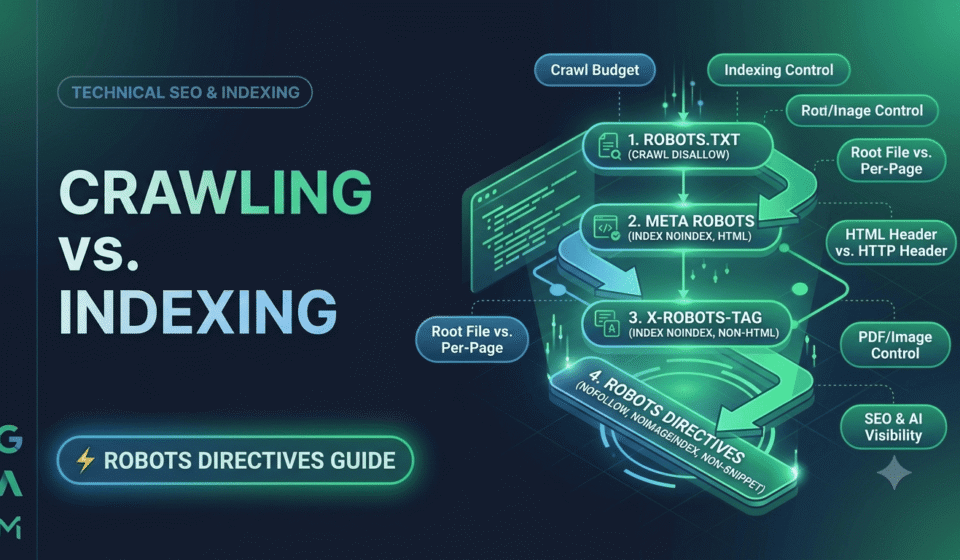
Robots.txt controls whether a search engine bot is allowed to crawl (visit) a page. Meta robots and X-Robots-Tag control whether a page is allowed to be indexed (shown in search results) once the bot has already crawled it.
That one distinction, crawling versus indexing, is the key to understanding all three. Get it wrong, and you can accidentally hide the wrong pages or leave the wrong ones visible.
Why This Mix-Up Happens So Often
Crawling and indexing sound like the same thing. They’re not.
Crawling is a bot visiting a page and reading it. Indexing is when Google decides to store that page and show it in search results.
A page can be crawled but not indexed. A page can also, in rare cases, be indexed without being properly crawled if enough other sites link to it. Once you separate these two ideas, the three tools we’re covering start to make a lot more sense.
What Is Robots.txt and What Does It Control?
Robots.txt is a simple text file that sits at the root of your website, like yoursite.com/robots.txt. It gives instructions to bots about which parts of your site they’re allowed to visit.
Here’s a basic example:
User-agent: *
Disallow: /admin/
This tells all bots to stay out of the /admin/ folder. Simple enough.
But here’s the part that trips people up: robots.txt controls crawling, not indexing. If other websites link to a page you’ve blocked in robots.txt, Google can still show that URL in search results. It just won’t have a title or description, because Google was never allowed to actually open the page and read it.
So robots.txt is more like a “don’t bother visiting” sign, not a “don’t show this” sign.
What Is a Meta Robots Tag and What Does It Control?
The Meta robots tag lives inside the HTML of a specific page, in the <head> section. It gives instructions about that one page, and it controls indexing, not crawling.
A typical example looks like this:
html
<meta name=”robots” content=”noindex, follow”>
This tells search engines two things at once. First, don’t index this page; keep it out of search results. Second, still follow the links on this page to discover other content.
This is the correct tool when you want a page to genuinely disappear from search results while still letting bots crawl through it to find other pages.
What Is an X-Robots-Tag and When Do You Use It?
X-Robots-Tag does basically the same job as Meta robots, with one key difference: it’s sent as part of the HTTP response header, not inside the page’s HTML.
Why does that matter? Because some files, like PDFs, images, and other non-HTML documents, don’t have a <head> section to place a Meta tag in. You can’t add a Meta robots tag to a PDF. You can add an X-Robots-Tag to it because it’s delivered at the server level.
A basic example looks like this:
X-Robots-Tag: noindex
So think of the X-Robots-Tag as Meta robots’ sibling, built for situations where an actual HTML tag isn’t an option.
Robots.txt vs. Meta Robots vs. X-Robots-Tag: Side-by-Side Comparison
|
Factor |
Robots.txt |
Meta Robots |
X-Robots-Tag |
|
What it controls |
Crawling access |
Indexing (per page) |
Indexing (per page or file) |
|
Where it lives |
Root file (yoursite.com/robots.txt) |
Inside the page’s HTML <head> |
HTTP response header |
|
Works on non-HTML files |
Yes, applies site-wide |
No |
Yes |
|
Can hide a page from search results |
Not reliably on its own |
Yes |
Yes |
|
Applies to |
Folders or URL patterns |
One page at a time |
One page or file at a time |
|
Best used for |
Keeping bots out of low-value or private sections |
Removing a specific page from search results |
Controlling indexing on PDFs, images, and other files |
What Happens If You Block a Page and Add Noindex at the Same Time?
Here’s the mistake that shows up again and again, even on well-built websites.
Someone blocks a page in robots.txt and adds a noindex tag to that same page, thinking they’re doubling up on safety. It actually backfires.
Since robots.txt tells the bot not to crawl the page at all, the bot never actually visits it. This means it never sees the noindex tag, because that tag is on the page itself, and the page was never opened.
The result is a page that can still linger in search results, sometimes as a bare link with no title or description, exactly the confusing outcome nobody wanted.
The fix is simple once you know it: if you actually want a page removed from search results, let bots crawl it, and use noindex to control indexing. Don’t block it in robots.txt at the same time.
Which One Should You Use: Robots.txt, Meta Robots, or X-Robots-Tag?
A simple way to decide which tool fits your situation:
Use robots.txt when you want to save crawl budget by keeping bots away from low-value areas like internal search results, admin folders, or filtered URL parameters that create endless duplicate pages. Understanding common crawl errors is also important when diagnosing why search engines can’t access or properly process your pages.
Use Meta robots when you want a specific HTML page to stay out of search results entirely, while still letting bots crawl its links to reach other pages.
Use X-Robots-Tag when you need the same control as Meta robots, but on a file type that can’t carry an HTML tag, like PDFs, images, or downloadable documents.
In many real websites, all three get used together, just for different purposes. That’s completely normal, as long as you understand what each one is actually doing.
What Are the Robots Directives (Noindex, Nofollow, and More)?
Both Meta robots and X-Robots-Tag accept the same set of directives, since they’re doing the same job through different delivery methods. Knowing what each one means makes it much easier to set these up correctly.
|
Directive |
What It Does |
|
index |
Allows the page to appear in search results (this is the default) |
|
noindex |
Keeps the page out of search results |
|
follow |
Allows bots to follow links on the page (this is the default) |
|
nofollow |
Tells bots not to pass authority through links on this page |
|
noarchive |
Stops search engines from showing a cached version of the page |
|
non-snippet |
Prevents a text snippet or preview from showing in search results |
|
noimageindex |
Stops images on the page from being indexed |
You can combine several of these in one line, like noindex, nofollow, if you want a page fully hidden and want to stop it from passing link value elsewhere too.
How to Check Your Site’s Setup in a Few Minutes
You don’t need to be a developer to spot obvious problems. A few quick checks can catch the most common issues.
Check Your Robots.txt File
Visit yoursite.com/robots.txt directly in a browser. Look for any Disallow rules on pages you actually want indexed, and check whether AI crawlers like GPTBot are blocked without you realizing it.
Inspect a Page’s HTML
Right-click any page, choose “view page source,” and search for “robots” to see if a meta tag is present and what it says. For JavaScript-heavy websites, however, it’s also important to understand how search engines render and process JavaScript. Learn more about optimizing JavaScript websites for SEO
Check Response Headers
For PDFs or other files, tools like browser developer tools or online header checkers can show you whether an X-Robots-Tag is present and what directive it’s using.
Use Google Search Console
The URL Inspection tool shows exactly how Google sees a page, including whether it’s blocked, indexed, or excluded, and why.
Running through these four checks on your most important pages takes maybe ten minutes and catches the vast majority of crawling and indexing mistakes before they become a real traffic problem.
Do Robots.txt and Meta Robots Affect AI Crawlers Like GPTBot?
In 2026, it’s not just Google and Bing reading your robots.txt file. AI crawlers like GPTBot, Google-Extended, and PerplexityBot check these same files to decide whether they can access and reference your content in AI-generated answers.
If your robots.txt accidentally blocks these AI crawlers, your content becomes invisible to tools like ChatGPT and Perplexity, even if it ranks well in traditional search. This is a detail many businesses miss simply because it wasn’t a concern a few years ago.
Getting your crawling and indexing setup right isn’t just a technical SEO checkbox anymore. It directly affects whether AI answer engines can find, read, and cite your content at all.
This is exactly the kind of gap VRN Exora looks for during a technical SEO audit, since a single misconfigured file can quietly block both search engines and AI crawlers without any obvious warning sign.
Final Thoughts: Getting Crawling and Indexing Right
Robots.txt, Meta robots, and X-Robots-Tag aren’t competing tools; they’re three different layers of control that work at different stages. Robots.txt decides who gets in the door. Meta robots and X-Robots-Tag decide what gets shown once they’re inside.
Understanding the difference isn’t just a technical detail for developers. It directly affects whether your pages, and now your content’s visibility to AI engines, show up the way you actually intended.
If you’re not sure whether your site’s crawling and indexing setup is working as you expect, it can help to have someone else take a look. VRN Exora’s free SEO audit checks technical details, so nothing important stays hidden from search engines or AI crawlers by accident.
Frequently Asked Questions
Does robots.txt stop a page from appearing in Google search results?
Not reliably. Robots.txt only stops a page from being crawled. If other sites link to that page, it can still show up in search results without a title or description, since Google never got permission to actually read it.
What’s the difference between noindex in Meta robots and disallow in robots.txt?
Noindex tells search engines not to show a specific page in results, while still allowing it to be crawled. “Disallow” tells bots not to crawl a page or folder at all. They operate at completely different stages of the process.
When should I use an X-Robots-Tag instead of Meta robots?
Use X-Robots-Tag for file types that don’t support HTML tags, like PDFs, images, or other downloadable files. For regular HTML pages, Meta robots work fine and are usually easier to manage.
Can I use robots.txt and Meta robots together?
You can use both, but not on the same page for the same purpose. If you want a page removed from search results, don’t block it in robots.txt, since that prevents the noindex tag from ever being seen.
How do I check if my robots.txt is accidentally blocking important pages?
Google Search Console has a robots.txt testing tool that shows exactly which URLs are blocked. Running a full technical audit is a more thorough way to catch these issues across your entire site, especially on larger websites with many folders and file types.