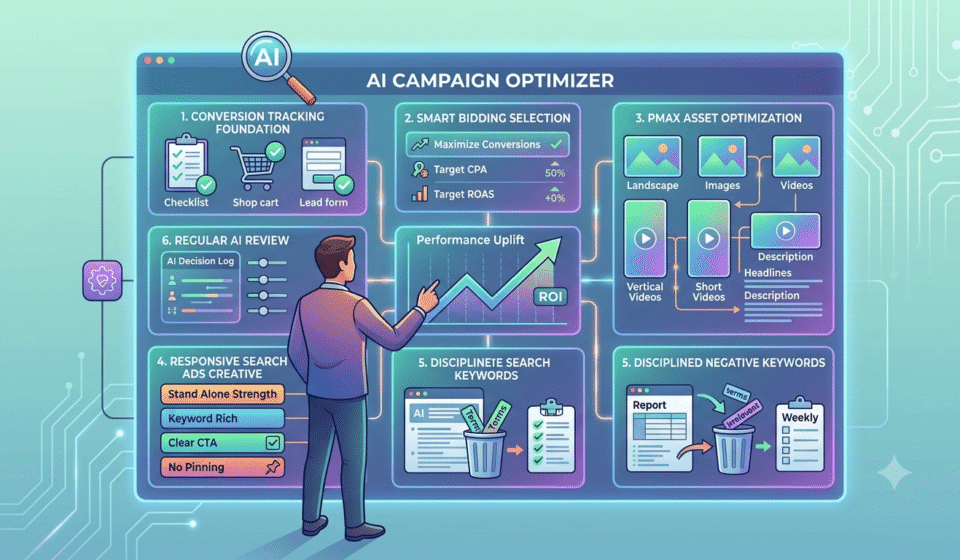

Running Google Ads today looks nothing like it did just a few years ago. Artificial intelligence now handles bidding, writes ad copy, chooses where your ads appear, and decides who sees them, often within a fraction of a second. Advertisers who understand how to guide this AI, rather than fight against it, are seeing stronger results with far less manual work.
Why AI Now Runs Most of Google Ads
Google has quietly rebuilt its advertising platform around artificial intelligence. Instead of a person manually setting a bid for every keyword, AI systems now study huge amounts of information in real time, then decide the right bid for that exact moment. One detailed 2026 study found that Google’s AI bidding engine processes more than 70 million real-time signals per single auction, including device type, location, time of day, and how likely a person is to actually buy.
This shift is not small or optional anymore. Performance Max, Google’s flagship AI-driven campaign type, now manages more than 80% of total ad spend for the median enterprise account, up sharply from just a couple of years ago. Advertisers using AI-powered bidding strategies like Target ROAS are also seeing real results, with cross-industry data showing these campaigns achieve >roughly 38% higher return on ad spend compared to manual bidding.
None of this means an advertiser’s job has disappeared. It means the job has changed. Instead of adjusting bids by hand every day, the real skill now lies in feeding the AI good information, checking its decisions regularly, and knowing exactly which of Google’s AI tools fits your specific goal. You can also read our latest article on The Future of Digital Marketing, where we discuss the impact of automation in greater depth.
Understanding the 3 Main AI Layers in Google Ads
Google Ads in 2026 runs on three connected AI systems that work together rather than compete. Understanding what each one actually does is the first real step toward using AI properly in your account.
|
AI Feature |
What It Actually Does |
Best Suited For |
|
Smart Bidding |
Adjusts your bid automatically for every single auction, based on real-time signals |
Any campaign type where conversion data is being tracked |
|
Performance Max |
Runs one AI-driven campaign across Search, Shopping, YouTube, Display, Gmail, and Maps |
Ecommerce, lead generation, and businesses wanting broad reach |
|
AI Max for Search |
Expands your existing keyword-based Search campaigns intelligently, while keeping search-level visibility |
B2B, service businesses, and anyone who needs to see exactly which queries triggered their ads |
Google’s own recommended setup for 2026 combines all three into what it calls a “Power Pack”: Performance Max for wide reach, AI Max for Search to capture high-intent searches with more transparency, and a separate campaign for upper-funnel brand awareness. According to Google’s own reported data, AI Max delivers an average lift in conversions at a similar cost per action compared to a standard Search campaign run without it.
5 Ways to Use AI to For More Effective Google Ads Campaigns
Step 1: Fix Your Conversion Tracking Before Anything Else
None of AI tools can make good decisions with bad information. Every single AI feature in Google Ads, from Smart Bidding to Performance Max, learns from your conversion data. If that data is wrong, incomplete, or delayed, every automated decision built on top of it will be wrong too.
Before turning on any AI feature, confirm the basics are solid:
- Conversion tracking is set up correctly and firing on the right actions, such as a real purchase or a genuine lead form submission
- Enhanced conversions are enabled, which helps Google match conversions more accurately even when cookies are limited
- Only meaningful actions count as conversions, not low-value clicks like a newsletter signup mixed in with real sales
Getting this foundation right before switching on automation is the single most important step in this entire process. Skipping it is like giving a very smart assistant the wrong instructions and then wondering why the results look off.
Step 2: Choose the Right Smart Bidding Strategy for Your Goal
Smart Bidding is the AI system quietly running behind almost every modern Google Ads campaign. Manual bidding, where a person sets a fixed bid for each keyword, is now considered outdated by most experienced advertisers, since it simply cannot react to real-time signals the way AI can.
A few common Smart Bidding strategies, and when each one makes sense:
- Maximize Conversions: A good starting point for newer accounts that want the most conversions possible within a set budget
- Target CPA (Cost Per Acquisition): Useful once you know roughly what you can afford to pay for each new customer or lead
- Target ROAS (Return on Ad Spend): Best for ecommerce businesses that want to protect profit margins while scaling spend
A newer feature called Smart Bidding Exploration pairs well with these strategies. It temporarily allows Google to bid slightly outside your normal target, within a range you approve, to test new traffic that would not have qualified otherwise. This gentle experimentation often uncovers new, profitable customer segments an advertiser would never have found by only sticking to their existing targets.
Step 3: Build Performance Max Campaigns with Strong Inputs
Performance Max works differently from older campaign types. Instead of picking specific placements yourself, you provide the AI with your goal, your budget, and a set of creative assets, then the system decides which channel to show your ad on, who to target, and how much to bid, all at the same time.
The advertisers getting the best results from Performance Max are not necessarily the ones with the biggest budgets. They are the ones who set the system up carefully from the start. A few practical guidelines worth following:
- Provide at least five distinct images, in multiple shapes such as landscape, square, and portrait
- Include at least five videos, with at least one in a vertical format for mobile and Shorts placements
- Add several headlines and descriptions of varying length, rather than just the bare minimum required
- Keep each asset group focused on one clear product category or customer type, rather than mixing everything into one group
Thin, minimal creative input almost always leads to weaker performance, since Google’s AI has less material to work with when deciding which combination to show a specific person.
Step 4: Write Responsive Search Ads That Work in Any Combination
Responsive Search Ads, often shortened to RSAs, are now the default ad format for Search campaigns. Instead of writing one fixed ad, you provide up to 15 headlines and 4 descriptions, and Google’s AI mixes and matches them to build the strongest possible ad for each individual search.
This shift changes how ad copy needs to be written. Every single headline must be able to stand on its own, since you cannot control exactly which headlines Google will pair together at any given moment. A few rules worth following when writing RSA headlines:
- Make each headline independently strong, never relying on a specific neighboring headline to make sense
- Include your main keyword in at least a few of your headlines, not just one
- Add a clear call to action in at least one headline, telling the reader exactly what to do next
- Only pin a headline in place when a legal, compliance, or brand rule truly requires it, since pinning limits how much Google’s AI can test
Google also shows an Ad Strength rating, ranging from Poor to Excellent, based on how much diverse, high-quality material you have provided. A higher rating simply means the AI has more room to test combinations. It does not automatically guarantee better performance on its own, so always check real conversion numbers alongside this rating rather than chasing the label by itself.
Step 5: Keep a Tight Grip on Negative Keywords
As Google’s AI expands keyword matching and audience targeting automatically, one manual task becomes more important than ever: negative keywords. These are words or phrases you tell Google to exclude, preventing your ad from showing up for searches that have nothing to do with your business.
AI-driven features like broad match and AI Max for Search are specifically designed to explore beyond your exact keyword list. This is powerful, but it also means irrelevant searches can slip through if nobody is watching closely. Left unmanaged, this wasted spend adds up quickly, and it quietly feeds noisy, low-quality data back into the very AI system trying to learn what works.
A simple routine keeps this under control:
- Run a search terms report every week, showing the actual phrases people typed before your ad appeared
- Add clearly irrelevant terms to your negative keyword list immediately
- Review this list monthly for patterns, rather than treating it as a one-time setup task
Step 6: Review AI Decisions Instead of Walking Away Completely
Turning on Google’s AI features does not mean stepping back entirely and letting the system run without any oversight. The most successful advertisers in 2026 treat AI as a powerful assistant that still needs regular check-ins, not a replacement for human judgment altogether.
- A simple weekly or biweekly review should cover a few key questions.
- Is the campaign actually spending its full budget, or is it being held back by targets that are too strict?
- Are the top-performing headlines and images still relevant to the current offer, or has the promotion changed since they were written?
- Has Ad Strength or overall conversion volume shifted in a way that needs attention?
If a Performance Max campaign is not spending its budget, this usually points to a specific, fixable cause, such as an overly restrictive bidding target, weak audience signals, or a landing page that is not converting well enough to justify more spend. Diagnosing the real cause, rather than simply raising the budget blindly, tends to produce far better results.
Step 7: Test New AI Features in a Controlled Way
Google regularly rolls out new AI capabilities, and not every feature deserves to be turned on across an entire account immediately. A smarter approach is testing new features on a smaller scale first, watching the results closely, before expanding them further.
Google’s own experiment tools make this fairly simple. Running a one-click experiment lets you compare a new AI feature directly against your existing setup, using a genuine split test rather than just guessing based on overall trends. This approach protects your main campaigns from any short-term dip while you learn how a new feature actually performs for your specific business and audience.
Common Mistakes Advertisers Make with AI in Google Ads
A few mistakes show up repeatedly across accounts that struggle to get good results from Google’s AI tools. Fragmenting an account into too many tiny ad groups is one of the biggest, since Google’s AI needs a reasonable volume of data to learn effectively, and spreading that data too thin starves the system of what it needs.
Another common mistake is providing only the bare minimum number of creative assets, then wondering why Performance Max is not performing well. A rich, varied set of images, videos, and text gives the AI far more material to match against different audiences and moments. Finally, many advertisers either ignore AI recommendations completely out of distrust, or accept every single suggestion without question. Neither approach works well. The better path sits in the middle: understand what each AI feature is actually optimizing for, then decide deliberately where to lean on automation and where human judgment should still lead.
Conclusion
Artificial intelligence has become the engine running most of Google Ads in 2026, handling bidding, creative testing, and audience targeting at a scale no human team could match manually. This does not remove the advertiser from the picture. It changes what the job actually looks like. Clean conversion tracking, thoughtful creative inputs, disciplined negative keyword management, and regular review of AI decisions remain firmly in human hands, even as the moment-to-moment execution shifts to the machine.
Advertisers who treat AI as a smart, capable partner rather than a mysterious black box tend to see the strongest results. Feed the system good data, give it strong creative material to work with, watch its decisions closely, and step in when something looks off. Done this way, AI in Google Ads becomes exactly what it should be: a tool that amplifies good strategy, rather than a replacement for it.
Frequently Asked Questions
- Should I switch entirely from manual bidding to Smart Bidding?
For most accounts with reasonable conversion volume, yes. Smart Bidding uses far more real-time signals than a human can track manually. Manual bidding now makes sense mainly for very new accounts with too little data for the AI to learn from yet.
- Why is my Performance Max campaign not spending its full budget?
This usually points to an overly strict bidding target, weak audience signals, thin creative assets, or a landing page that is not converting well. Review these areas one at a time rather than simply increasing the budget without diagnosing the cause.
- Do I still need to manage negative keywords if AI handles targeting?
Yes, and arguably more than before. AI features like broad match and AI Max expand your reach automatically, which can bring in irrelevant searches. Regular negative keyword reviews keep spend focused and improve the quality of data feeding the AI.
- How many headlines and images should I provide for AI-driven campaigns?
Provide as many high-quality, distinct options as the platform allows, generally at least five images in different formats and multiple headlines of varying length. More diverse, strong assets give Google’s AI more material to match effectively.
- Is Performance Max better than a standard Search campaign?
Neither is universally better. Performance Max offers broader reach across Google’s full inventory, while standard Search or AI Max for Search gives more visibility into which exact queries triggered your ads. Many advertisers benefit from running both together.