
Publish a page and nothing happens. No traffic, no visibility, no rankings. Why? Because Google hasn’t found it yet.
Before any page can show up in search results, Google has to discover it, crawl it, and decide it deserves a spot in the index. That process can take hours. It can take months. Sometimes it never happens at all.
An analysis of 16 million webpages found that only 37.08% ever achieve full indexing. The rest, 61.94%, sit on indexed domains but never make it into search results themselves. On the bright side, 14.00% of pages get indexed within the first week, and 64.86% within the first month, when the fundamentals are right.
If you just launched a website, published a new blog, or updated a service page, this guide walks you through exactly how indexing works, how to check your status, and how to speed things up.
What Does It Mean When Google Indexes a Page?
Publishing isn’t the same as being found.
Before Google shows your page to anyone, it has to find it, read it, and decide whether it belongs in the index, Google’s massive database of stored web pages.
Think of the index as a library. When someone searches, Google doesn’t scan the live internet. It pulls from what’s already catalogued on its shelves. No spot on the shelf, no appearance in results. That’s why indexing comes before everything else in SEO.
How Google Adds Your Pages to Search Results
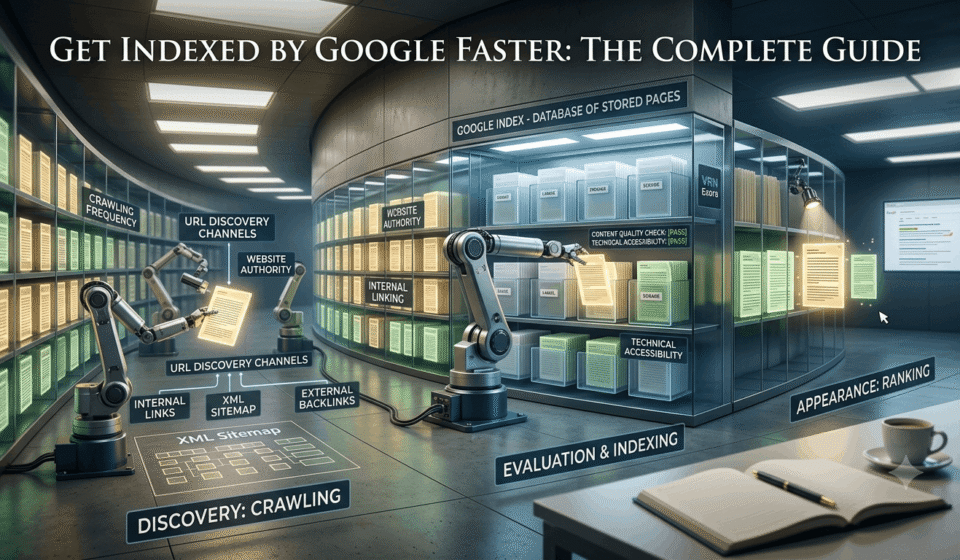
Three stages get you there: crawling, indexing, ranking. Each one does a different job.
Crawling is discovery. Googlebot, Google’s automated crawler, finds your page through internal links, your XML sitemap, external backlinks, or URLs it already knows about. Getting crawled just means Google noticed you exist. Nothing more.
Indexing is evaluation. Once Googlebot reads your page, Google decides whether it’s worth storing. It looks at what the page covers, whether the content is genuinely useful, whether it’s technically accessible, and whether it adds something existing pages don’t already offer. Pass that test, and you’re in the index.
Ranking is competition. Say a company publishes a new page on commercial roofing services. Google finds it, indexes it. But hundreds of other sites already have similar pages. Now Google has to decide who answers the query best, based on relevance, authority, experience, and dozens of other signals. Getting indexed gets you in the room. Ranking is winning the argument once you’re there.
Why Some Pages Get Indexed Faster Than Others
Some pages get indexed in hours. Others wait weeks. Google doesn’t crawl every site equally, and here’s what tips the scale.
1. Website authority
A major news site publishing daily gets crawled constantly, because Google already trusts it to be active and reliable. A brand-new domain has no track record yet, so it waits longer.
2. Crawl frequency
How often you publish, how often you update, your server’s performance, your internal linking, all of it shapes how often Googlebot bothers to show up.
3. Internal linking
Pages with no links pointing to them are called orphan pages, and orphans are notoriously hard for Google to find. Link a new page from your homepage, a related service page, or a relevant blog post, and you’re handing Google a map.
4. Content quality
Thin pages built to target keywords don’t impress anyone, least of all Google. A page that genuinely answers a specific query stands a far better chance.
5. Technical accessibility
None of this matters if Google can’t reach the page in the first place. Blocked crawling, broken settings, slow servers, these create walls Google won’t climb over.
How Can You Check If Google Has Indexed Your Page?
Before assuming Google hasn’t found your page, check what’s actually going on. Maybe it’s indexed but ranking too low to notice. Maybe it got crawled and excluded. Maybe there’s a technical block. Two tools tell you the truth.
Check Indexed Pages Using Google Search Operators
Type site:yourwebsite.com into Google, and you’ll see what’s currently stored in the index for your domain. Want to check one specific page? Search site:yourwebsite.com/example-page/. If it shows up, it’s indexed.
Treat the count as a rough estimate, not gospel. And if nothing appears, it could mean the page isn’t indexed yet, got removed, is blocked, or Google simply chose not to include it.
Use Google Search Console to Review Indexing Status
Search operators give you a glance. Google Search Console, a free indexing tool, gives you the real picture.
Once your site is verified, the Pages report breaks your URLs into categories: Indexed Pages (successfully added, though indexing alone won’t guarantee rankings), Excluded Pages (known but not indexed, often due to duplicates, noindex tags, or canonical issues), and Error Reports (server errors, redirect problems, robots.txt blocks). Knowing which bucket your page falls into tells you exactly what to fix next.
Inspect Individual URLs Before Requesting Indexing
The URL Inspection tool checks a single page: when Google last crawled it, whether it’s eligible for indexing, and what’s holding it back, be it a noindex tag, a robots.txt block, or an HTTP error.
Search Console tells you what Google thinks about one URL. A site-wide audit tool like VRN Exora complements it by scanning every page across a large website for crawlability and indexability issues at once.
What Should You Do Before Requesting Google to Index Your Page?
Requesting indexing helps, but jumping straight to it wastes your effort if something’s blocking Google underneath. Fix the foundation first.
Make Sure Google Can Access Your Important Pages
Check for the usual suspects: a robots.txt rule accidentally blocking the page (common after a redesign), a stray noindex tag left on a live page, a canonical tag pointing Google somewhere else, broken HTTP status codes like 404s or 5xx errors, a slow or unreliable server, or a page with no internal links and no sitemap entry.
Manually auditing all of this across a large site takes real time. That’s where a tool like VRN Exora earns its keep, surfacing crawlability and indexing barriers across your entire domain in one pass.
Create Internal Links to Help Google Discover New Pages
Orphan pages, ones with no internal links pointing to them, are genuinely hard for Google to find. Link new content from relevant blog posts, category pages, or navigation menus. Connect it to older pages that already carry traffic and authority. You’re building the path Googlebot needs to walk.
Submit a Clean XML Sitemap with Your Important URLs
Your sitemap should only include pages you actually want indexed: correct canonical URLs, current content, nothing broken. Strip out duplicates, redirects, error pages, and blocked URLs. A messy sitemap confuses Google about what actually matters on your site.
Improve Page Quality Before Google Crawls It
Before you ask Google to look, make sure there’s something worth seeing. Original information, not copied. Content that matches what the searcher actually wants. More value than what’s already ranking. Thin or duplicate pages get crawled, sure, but they rarely make the cut into the index.
How Can You Get Google to Index Your Pages Faster?
Once the foundation is solid, technically sound, well-linked, genuinely useful, these steps help Google find and trust your content faster. Note: nothing here forces instant indexing. Google still runs its own quality checks.
Request Indexing Through Google Search Console
The URL Inspection tool lets you request a recrawl. Use it when you publish a major new page, update something significant, launch a product, or fix a technical issue that was blocking indexing.
Before you hit submit, confirm the page is accessible, free of indexing restrictions, genuinely valuable, and connected through internal links. A request on a broken page is a wasted request.
Promote New Pages Through Existing High-Authority Pages
Google trusts the pages it already crawls regularly. Link your new page from your homepage, a relevant category page, or a popular blog post already getting traffic, and you’re routing that trust straight to it.
Publish Content Consistently to Encourage Regular Crawling
Google learns your publishing rhythm. When you consistently publish useful, original content, search engines have more reasons to return and crawl your website. However, publishing content simply for the sake of volume can backfire. Duplicate, outdated, or thin pages may create more problems than they solve. Regularly reviewing your content through an LLM SEO audit can also help ensure your pages remain accessible, well-structured, and useful for both search engines and AI-powered search tools.
Earn External Mentions That Help Google Discover Your URLs
Backlinks, brand mentions, and digital PR all give Google another route to your content, whether that’s an industry publication, an expert interview, or research coverage. One relevant mention from a trusted site beats a dozen low-quality ones.
Why Is Google Not Indexing Your Pages?
Tried everything above and still nothing? Time to diagnose. Google either can’t reach your page, or it reached it and decided not to keep it.
Pages Might Be Blocked from Crawling
Look for robots.txt errors (common after migrations), authentication walls hiding pages behind logins, and server problems like frequent downtime or slow responses.
Google Crawled Pages But Did Not Index
Sometimes Google sees the page and passes anyway. Usual culprits: thin content with no clear purpose, duplicate pages competing with a preferred version, or content that simply doesn’t offer anything new.
Technical Issues Preventing Proper Indexing
Wrong canonical tags telling Google to prioritize a different URL. Messy redirect chains or loops. 5xx server errors and poor mobile usability. On a large site, these problems hide easily, which is exactly what a tool like VRN Exora is built to catch.
Certain Signals Making Google Ignore Your Pages
Duplicate content adding nothing new. Auto-generated pages built purely for keywords. A slow, clunky experience that doesn’t match what the searcher wanted. Clean these up, and you remove the reasons Google had to say no.
How Long Does Google Take to Index a New Page?
There’s no fixed answer. Some pages go live within hours. Others sit for weeks.
What influences indexing: domain history and authority, the sheer size of your website, how often Google already crawls you, and how much internal support (links, sitemap presence) the page has.
When to worry: brand-new sites and very large sites naturally take longer, that’s normal. But a page sitting unindexed for months, on an established site, usually points to a real problem: technical, structural, or quality-related.
How Can You Maintain Faster Indexing for Future Pages?
Getting indexed once is a task. Staying easy to index is a habit. Keep your site structure logical, your navigation clean, and avoid overcomplicating your URL hierarchy. Check Search Console regularly, coverage reports, URL Inspection, notifications, so problems get caught early instead of discovered months later. Revisit old content periodically. Updating outdated information, refreshing internal links, and adding real value gives Google a reason to keep coming back.
Frequently Asked Questions About Google Indexing
How do I get Google to index my website faster?
Fix accessibility, build internal links, submit a clean sitemap, and remove technical blockers like noindex tags or server errors. Then request indexing for key pages through Search Console.
Can I force Google to index a page immediately?
No. Requesting indexing just tells Google a page is ready. Google still decides whether and when to add it, based on quality and accessibility.
Why is Google not indexing my new page?
Usually one of two things: Google can’t access it (technical block), or Google accessed it and decided it wasn’t worth adding (quality or duplication issue).
Does submitting a sitemap help Google index faster?
It helps Google discover your URLs, but it’s not a guarantee. Pair it with solid internal linking and genuinely good content.
How long does Google take to index a new website?
Anywhere from a few days to several weeks, depending on domain history, structure, and how easily Google can crawl the site.
Does Google index every page on a website?
No. Google skips pages with duplicate content, technical issues, low value, or explicit indexing blocks.
Should I request indexing after every content update?
No, save it for the updates that matter, new pages, major rewrites, product launches. Minor edits don’t need a fresh request.