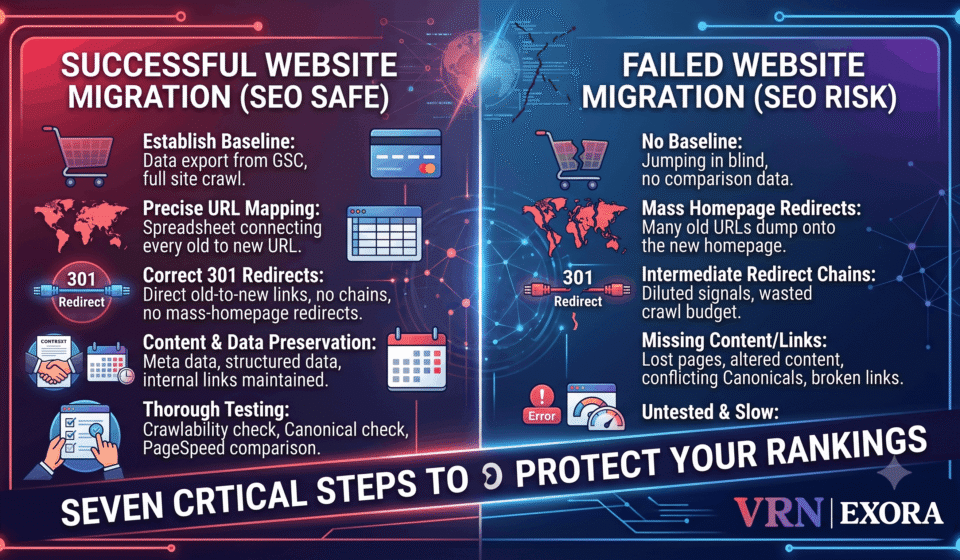

A website migration can erase years of SEO progress in a single weekend, and industry reports consistently show traffic drops ranging from twenty to seventy percent when migrations are poorly planned. This guide is for site owners, developers, and SEO managers preparing to replatform a CMS, redesign a site, restructure URLs, or move to a new domain, who want a clear, sequenced process for protecting rankings through that change. You will learn how to establish a proper baseline, map and redirect every URL correctly, what to test before launch, and how to tell a normal post-migration dip from a genuine problem that needs immediate attention.
Why Website Migrations Are One of the Riskiest SEO Events
A website migration is any substantial change that affects how search engines crawl, understand, index, or rank a site’s pages, including replatforming a CMS, restructuring a URL hierarchy, moving to a new domain, or even a significant redesign that changes navigation, templates, and copy while the domain itself stays the same. These changes are risky specifically because they touch the exact signals search engines depend on to maintain continuity: URL structure, internal linking, content, and technical infrastructure all shift at once, and any gap between the old and new state creates real, measurable risk of lost visibility.
Step 1: Establish Your Baseline Before Touching Anything
Before any development work begins, export at least twelve months of data from Google Search Console and Bing Webmaster Tools, covering which pages receive clicks and impressions, which queries drive traffic, and where pages currently rank on average. Crawl the entire existing site with a tool like Screaming Frog, and export the full backlink profile as well, since this baseline is what every post-migration comparison will be measured against. Skipping this step means having no reliable way to distinguish a genuine ranking loss from normal fluctuation once the new site goes live, since there is nothing solid to compare the new numbers against.
Step 2: Map Every Old URL to Its New Destination
With the baseline complete, build a comprehensive URL mapping spreadsheet connecting every existing URL to its corresponding destination on the new site. This document needs to live somewhere both developers and the SEO team can access and validate it together, since a migration treated purely as a development project with SEO brought in only after launch is one of the most common causes of avoidable ranking loss. Every URL that carries real organic value, even a modest one, needs an intentional destination, not a default fallback to the homepage.
Step 3: Implement 301 Redirects Correctly
Permanent 301 redirects are the single most critical technical element of the entire migration, since Google has confirmed that properly implemented 301 redirects pass most of a page’s accumulated link equity to its new destination. Point every redirect directly from the old URL to its final new destination, never through an intermediate URL, since redirect chains waste crawl budget and can dilute the signal passed through to the final page. Never mass-redirect a large batch of unrelated old URLs to the homepage as a shortcut, since this pattern signals a poorly executed migration to search engines and fails to preserve any of the specific relevance the original page had built.
Step 4: Preserve Content, Internal Links, and Metadata
Ranking losses during a migration are frequently caused not by the redirect strategy itself but by what changes alongside it: missing pages, altered content that no longer matches what previously ranked, broken internal links, conflicting canonical tags, or new page templates that are technically weaker than what they replaced. Preserve high-performing content and URLs wherever genuinely possible, maintain the internal linking structure pointing to your most valuable pages, and carry over metadata, title tags, meta descriptions, and structured data, deliberately rather than assuming a platform migration will replicate it automatically.
Step 5: Test Everything on Staging Before Launch
Before the new site goes live, test crawlability directly on a staging environment, confirming search engines will be able to reach, render, and index the new pages once the switch happens. Verify canonical tags point to the correct, intended URLs, confirm analytics and Search Console tracking is properly configured on the new site, and run the new site through PageSpeed Insights, since a new site that is slower than the one it replaces starts the migration at a real, avoidable disadvantage. If site speed comes back worse than the current baseline, fix that regression before migrating rather than treating it as a post-launch cleanup task.
Step 6: Launch Day Checklist
Launch midweek rather than right before a weekend, so any issues that surface get caught and addressed while a full team is actively available to respond. Confirm redirects are live and functioning, SSL is valid across the new domain, no stray noindex directives have accidentally carried over from a staging environment, and a clean, accurate XML sitemap reflecting only the new site’s intended URLs has been submitted to Search Console. Remove any old, staging, or intentionally dropped URLs from that sitemap entirely, since a sitemap listing pages you do not actually want indexed sends a confusing signal at exactly the moment search engines are trying to make sense of the change.
Step 7: Post-Migration Monitoring
Rankings rarely drop all at once, they typically erode gradually over three to four weeks as Google finishes reprocessing everything that changed, which means a deceptively quiet first week is not necessarily evidence of a clean migration. Compare traffic against your established baseline weekly rather than daily, since day-to-day fluctuation is normal and not yet meaningful on its own. Fix any 404 errors within twenty-four to forty-eight hours of discovery, and check Core Web Vitals against pre-migration numbers specifically, since a new CMS or hosting environment can quietly regress Largest Contentful Paint, Interaction to Next Paint, and Cumulative Layout Shift all at once without an obvious, immediately visible cause.
What a Normal Dip Looks Like vs a Real Problem
A temporary ranking or traffic dip in the range of roughly ten to fifteen percent during the first few weeks after a migration is generally considered normal, reflecting the time search engines genuinely need to recrawl old URLs, process redirects, and re-index the new pages. A sustained drop of thirty percent or more is a different situation entirely, and it means something is genuinely wrong that needs immediate investigation rather than more patience. Most well-executed migrations fully recover within roughly four to eight weeks, though the exact timeline depends heavily on site size and how extensive the underlying changes actually were.
Don’t Forget AI Search Visibility
Search visibility in 2026 extends meaningfully beyond traditional organic rankings, and migration planning needs to account for that. Some pages get surfaced or cited by AI-powered search experiences even when they are not among a site’s highest-ranking traditional organic pages, which means a migration plan focused purely on traditional rank preservation can still damage a real, separate source of visibility if it is not considered directly. AI visibility depends on the same underlying technical fundamentals that protect traditional rankings, clean redirects, intact structured data, and reliable crawlability, so a technically sound migration plan generally protects both forms of visibility at once, provided AI-cited pages are specifically identified and preserved with the same care as top-ranking traditional pages.
Frequently Asked Questions
How long does it take rankings to recover after a website migration?
Most well-executed migrations see traffic stabilize within roughly four to eight weeks, though the exact timeline depends on site size and the scope of changes involved. A temporary dip in the first few weeks while Google recrawls and reprocesses the site is normal and expected.
What traffic drop after a migration should I actually be worried about?
A temporary dip of ten to fifteen percent in the first few weeks is generally considered normal. A sustained drop of thirty percent or more signals a genuine problem, missing redirects, blocked crawling, or a technical regression, that needs immediate investigation rather than waiting it out.
Is it ever safe to redirect old URLs to the homepage instead of mapping each one individually?
No, not as a general strategy. Mass-redirecting unrelated URLs to the homepage fails to preserve the specific relevance each original page had built and signals a poorly executed migration to search engines. Every URL carrying real organic value needs an individually mapped, relevant destination.
What is the single most important technical element of an SEO-safe migration?
Properly implemented 301 redirects mapping every old URL directly to its new destination without chains. Google has confirmed these pass most of a page’s link equity forward, making them the foundation the rest of the migration’s SEO outcome depends on.
Should I involve SEO before or after development begins on a migration?
Before. Migrations treated purely as a development project, with SEO brought in only after launch, are a common, avoidable cause of ranking loss, since redirect strategy, crawl priorities, and content preservation all need to be planned before development work starts, not retrofitted afterward.
Does a website migration affect AI search visibility too, not just traditional rankings?
Yes. Some pages get cited by AI-powered search experiences independent of their traditional ranking position, so a migration plan should specifically identify and preserve those pages with the same redirect and technical care applied to top-ranking traditional pages.
Get a Free Expert Review of Your Migration Plan
A migration is only as safe as the plan behind it, and small gaps in that plan are what actually cause lost rankings. If you want a faster starting point, get a free SEO audit from VRN Exora and get a clear baseline before you move.